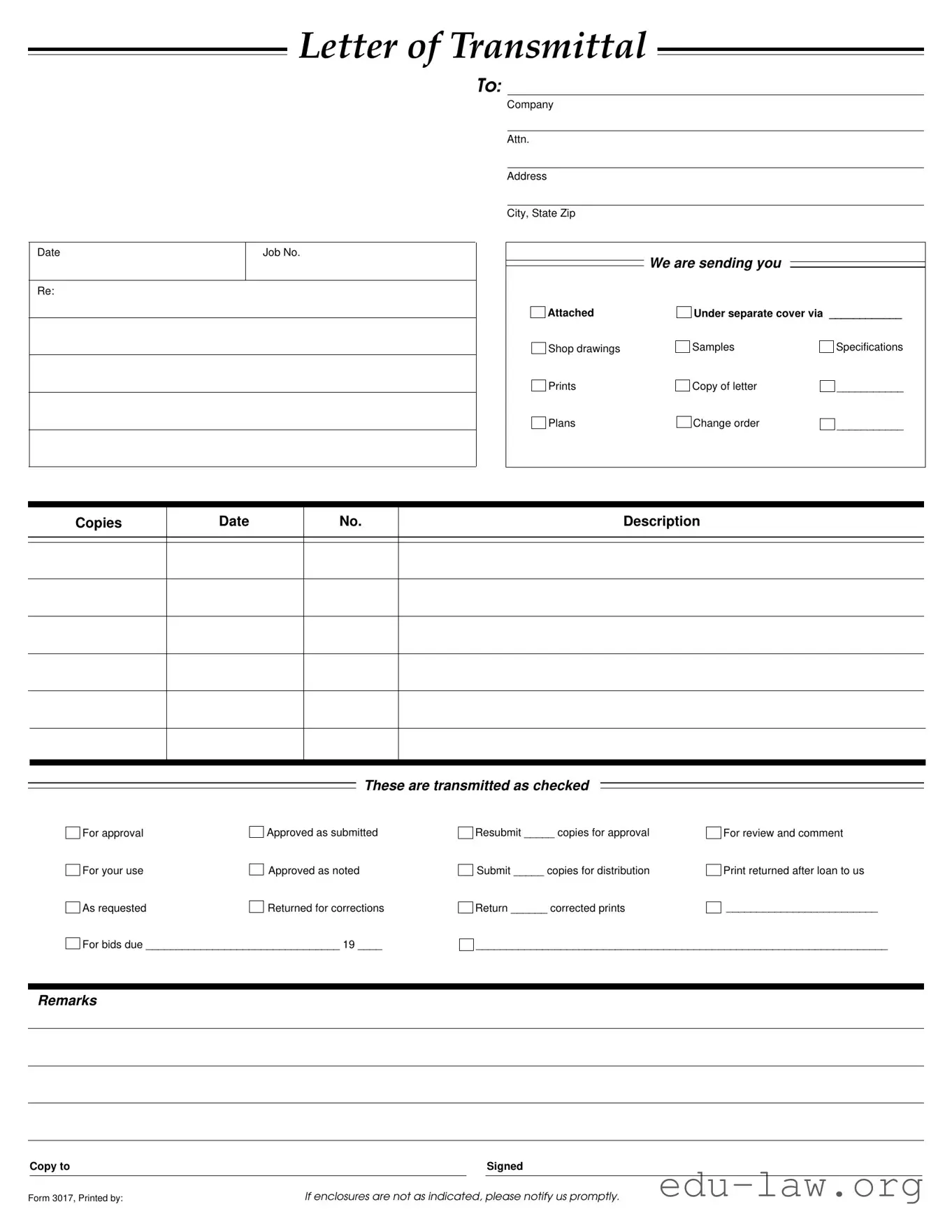
The Transmittal form serves as an essential communication tool in various professional settings, particularly in construction and project management. It facilitates the organized delivery of important documents, such as shop drawings, specifications, and change orders. This form includes key details such as the date, job number, and the recipient's information, ensuring that all parties are on the same page. Each item being sent is clearly listed, allowing for easy reference and tracking. The sender can indicate the purpose of the transmission, whether it is for approval, review, or corrections. Additionally, there are spaces to note any remarks or additional instructions, making it a versatile document that caters to specific project needs. By using this form, individuals and companies can maintain clarity and accountability throughout the project lifecycle, minimizing misunderstandings and enhancing collaboration.
LETTER OF TRANSMITTAL
TO:
Date
Re:
Job No.
Company
Attn.
Address
City, State Zip
We are sending you
Attached |
Under separate cover via ____________ |
|
Shop drawings |
Samples |
Specifications |
Prints |
Copy of letter |
___________ |
Plans |
Change order |
___________ |
Copies
Date
No.
Description
These are transmitted as checked
For approval |
|
Approved as submitted |
For your use |
|
Approved as noted |
|
||
As requested |
|
Returned for corrections |
|
For bids due ________________________________ 19 ____
Resubmit _____ copies for approval |
For review and comment |
Submit _____ copies for distribution |
Print returned after loan to us |
Return ______ corrected prints |
_________________________ |
____________________________________________________________________
Remarks
|
Copy to |
|
|
Signed |
|
|
|
|
|
Form 3017, Printed by: |
If enclosures are not as indicated, please notify us promptly. |
|||
| Fact Name | Description |
|---|---|
| Purpose | The Transmittal Form serves as a cover letter for sending documents such as drawings and specifications. |
| Date | The form includes a section to specify the date of transmission, ensuring clear communication of timelines. |
| Job Number | A job number is included to help track and reference specific projects efficiently. |
| Recipient Information | It requires the recipient's name, company, and address to ensure proper delivery of documents. |
| Document List | The form allows for listing various types of documents being sent, such as shop drawings and samples. |
| Approval Status | Users can indicate the approval status of the transmitted documents, which helps clarify the review process. |
| Resubmission Instructions | Instructions for resubmission are included, outlining how many copies are needed for approval. |
| Remarks Section | A remarks section is provided for additional notes or instructions related to the transmission. |
| Governing Law | The use of the Transmittal Form may be governed by specific state laws regarding construction and documentation. |
After completing the Transmittal form, it is important to review the information provided to ensure accuracy. Once filled out, the form should be sent to the designated recipient along with any accompanying documents. This process helps to maintain clear communication and proper documentation.
What is a Transmittal Form?
A Transmittal Form is a document used to accompany materials being sent from one party to another. It serves as a cover letter that outlines what is included in the shipment, such as shop drawings, samples, or specifications. This form helps ensure clarity and provides a record of what was sent and when.
What information should be included in a Transmittal Form?
The Transmittal Form should include the date, job number, company name, and the recipient's contact information. It should also list the items being sent, such as plans, change orders, or other relevant documents. Additionally, it may contain remarks and instructions regarding the materials, as well as a space for the sender's signature.
How do I fill out a Transmittal Form?
To fill out a Transmittal Form, start by entering the date and job number at the top. Next, provide the recipient's name and address. Then, list the items being transmitted, indicating their status—whether they are for approval, for use, or returned for corrections. Finally, include any remarks and sign the form. Make sure to double-check that all enclosures are accurately noted.
Why is it important to use a Transmittal Form?
Using a Transmittal Form is important because it creates a clear record of communication between parties. It helps prevent misunderstandings about what has been sent and ensures that all necessary materials are included. This form can also serve as a reference in case of disputes or questions about the transmission.
What should I do if the enclosures are not as indicated on the Transmittal Form?
If the enclosures do not match what is indicated on the Transmittal Form, it is essential to notify the sender promptly. This ensures that any discrepancies can be addressed quickly, preventing delays in the project or misunderstandings about the materials sent.
Can a Transmittal Form be used for electronic submissions?
Yes, a Transmittal Form can be adapted for electronic submissions. Many companies use digital versions of the form, allowing for easy sharing via email or project management software. Regardless of the format, the essential information should still be included to maintain clarity and record-keeping.
How does the Transmittal Form facilitate communication between parties?
The Transmittal Form facilitates communication by clearly outlining what is being sent and the purpose of the transmission. It provides a structured way to convey important details, such as deadlines for approvals or specific instructions. This clarity helps keep all parties informed and aligned on project requirements.
What are common mistakes to avoid when using a Transmittal Form?
Common mistakes include failing to include all necessary items, not clearly indicating the status of each item, or neglecting to sign the form. Additionally, using vague remarks can lead to confusion. Always ensure that the form is complete and accurate before sending it to avoid these pitfalls.
Is there a standard format for a Transmittal Form?
While there is no universally mandated format for a Transmittal Form, many organizations have their own templates that they prefer to use. These templates typically include the same key elements: sender and recipient information, a list of enclosures, and space for remarks. It’s advisable to follow your organization’s standard to maintain consistency.
Incomplete Information: One common mistake is failing to fill in all required fields. Essential details like the date, job number, and recipient's address must be accurate and complete. Omitting any of these can lead to confusion or delays.
Incorrect Attachments: People often forget to double-check that the items listed as attached actually match what is included. If the form states that shop drawings are attached, but only samples are included, it can cause significant issues.
Misunderstanding Approval Options: Many individuals do not fully understand the different approval options available on the form. Selecting the wrong option, such as "For approval" instead of "Approved as noted," can lead to miscommunication about the status of the submitted documents.
Neglecting to Sign: A simple yet critical oversight is forgetting to sign the form. Without a signature, the document may be considered incomplete, leading to unnecessary back-and-forth communication.
The Transmittal form is a crucial document in various professional settings, particularly in construction and project management. It serves as a cover sheet for transmitting other documents, ensuring that all relevant materials are included and properly accounted for. Several other forms and documents are often used in conjunction with the Transmittal form to facilitate communication and maintain organized records. Below is a list of these documents, along with brief descriptions of each.
Each of these documents plays a vital role in the overall project management process. Together with the Transmittal form, they contribute to effective communication and documentation, which are essential for successful project execution.
The Transmittal form serves a specific purpose in the communication of documents between parties. One similar document is the Cover Letter. A Cover Letter often accompanies other documents, providing a brief introduction and context for the materials enclosed. It typically includes the sender's contact information, a summary of what is being sent, and any necessary instructions or notes. Like the Transmittal form, a Cover Letter aims to clarify the purpose of the transmission and ensure that the recipient understands the contents and their relevance.
An Invoice is another document that shares similarities with the Transmittal form. While an Invoice details the goods or services provided and the amount due, it also serves as a formal communication tool. Both documents include specific information such as dates, descriptions, and recipient details. They function to inform the recipient about the transaction and facilitate further action, whether it be payment in the case of an Invoice or review and approval in the case of a Transmittal form.
The Purchase Order (PO) is also comparable to the Transmittal form. A Purchase Order is a document issued by a buyer to a seller, indicating the types, quantities, and agreed prices for products or services. Similar to the Transmittal form, a PO outlines essential information and serves as a record of the transaction. Both documents help streamline communication and ensure that all parties are on the same page regarding expectations and deliverables.
The Acknowledgment Receipt is another document that shares characteristics with the Transmittal form. An Acknowledgment Receipt confirms the receipt of documents or goods. It typically includes details about what has been received and may require a signature for verification. Like the Transmittal form, it serves to document the exchange and provides a record for both parties involved in the transaction.
Meeting Minutes can also be likened to the Transmittal form in terms of their function as a communication tool. Meeting Minutes summarize discussions and decisions made during a meeting, providing a record for attendees and those who could not attend. Both documents aim to convey important information and ensure that everyone is informed about the status of projects or agreements.
The Change Order is another document that bears similarities to the Transmittal form. A Change Order is used to modify an existing agreement or contract, detailing the changes to be made. Both documents include important details such as dates and descriptions, and they serve to formalize communication regarding updates or revisions to a project, ensuring that all parties are aware of changes and their implications.
Finally, the Delivery Receipt is akin to the Transmittal form in that it serves as proof of delivery for goods or documents. A Delivery Receipt confirms that items have been received by the intended recipient. Both documents include essential information, such as dates and descriptions, and function to document the exchange, providing a record for future reference and accountability.
When filling out the Transmittal form, consider the following guidelines to ensure accuracy and clarity.
Following these guidelines will help facilitate smooth communication and processing of your transmittal.
Misconceptions about the Transmittal form can lead to confusion in project communication. Here are four common misunderstandings:
When it comes to using the Transmittal form effectively, there are several key points to keep in mind. This form is essential for ensuring clear communication and proper documentation in any project. Here are some important takeaways:
By keeping these points in mind, you can enhance the effectiveness of your communication and ensure a smoother workflow in your projects.