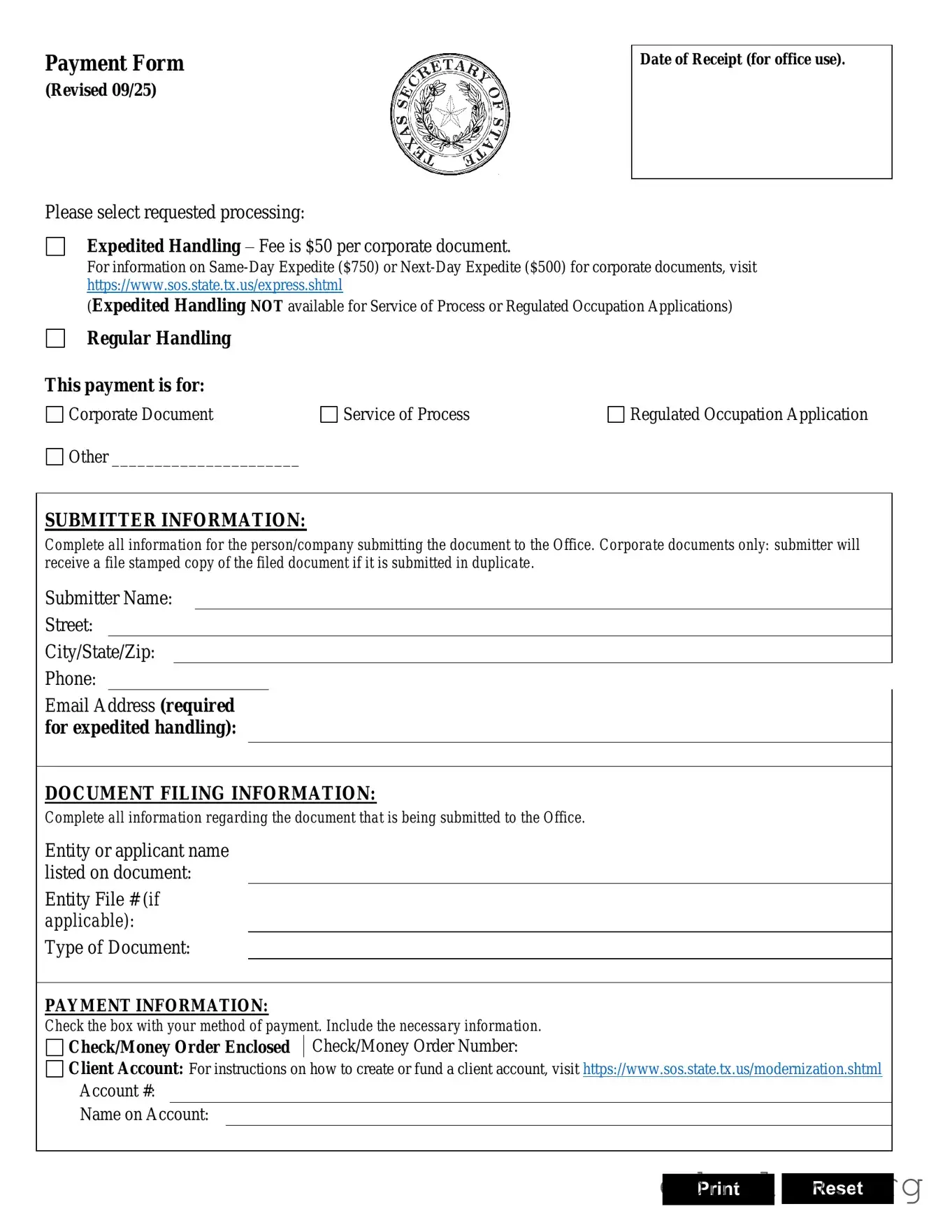
The Texas SOS Payment 807 form is an essential document for individuals and businesses looking to manage various filing requests with the Secretary of State's office. This form allows users to select between expedited or regular handling for their submissions, ensuring that documents are processed in a timely manner. For those opting for expedited service, a nominal fee is required, which varies depending on the type of document being filed. It’s important to accurately fill out the submitter information, which includes the name, address, and contact details of the person or company submitting the documents. Additionally, the form requires specific details about the document being filed, such as the type of document and the number of pages. Payment information is also a crucial component; submitters can choose from various methods, including credit cards and checks, while being aware of any convenience fees that may apply. Finally, providing a return address is necessary to ensure that the processed documents are sent back to the correct location. Understanding these elements can streamline the filing process and help avoid any delays.
Payment Form
(Revised 09/25)
Please select requested processing:
Expedited Handling – Fee is $50 per corporate document.
Date of Receipt (for office use).
For information on
(Expedited Handling NOT available for Service of Process or Regulated Occupation Applications)
Regular Handling
This payment is for:
Corporate Document |
Service of Process |
Regulated Occupation Application |
Other ______________________ |
|
|
SUBMITTER INFORMATION:
Complete all information for the person/company submitting the document to the Office. Corporate documents only: submitter will receive a file stamped copy of the filed document if it is submitted in duplicate.
Submitter Name:
Street:
City/State/Zip:
Phone:
Email Address (required for expedited handling):
DOCUMENT FILING INFORMATION:
Complete all information regarding the document that is being submitted to the Office.
Entity or applicant name listed on document:
Entity File # (if applicable):
Type of Document:
PAYMENT INFORMATION:
Check the box with your method of payment. Include the necessary information.
Check/Money Order Enclosed Check/Money Order Number:
Client Account: For instructions on how to create or fund a client account, visit https://www.sos.state.tx.us/modernization.shtml
Account #:
Name on Account:
Print Reset
| Fact Name | Description |
|---|---|
| Purpose of Form | The Texas SOS Payment 807 form is used for submitting payment related to document filings with the Secretary of State, including expedited handling requests. |
| Governing Laws | This form is governed by the Texas Business Organizations Code and the Texas Administrative Code, which outline the rules for document filings. |
| Payment Methods | Acceptable payment methods include credit cards (Visa, Mastercard, Discover, American Express) and checks or money orders. A convenience fee applies for credit card payments. |
| Handling Options | Submitters can choose between expedited and regular handling. Expedited handling incurs additional fees and is not available for certain services. |
| Submission Requirements | Complete information about the submitter and the document being filed is required. This includes contact details and the type of document submitted. |
Filling out the Texas SOS Payment 807 form is straightforward. This form is essential for submitting payment for document filings with the Texas Secretary of State. Follow these steps carefully to ensure your submission is complete and accurate.
After completing the form, review all entries for accuracy. Ensure you have included all necessary information before submitting it to the Texas Secretary of State. This will help avoid any delays in processing your request.
What is the Texas SOS Payment 807 form used for?
The Texas SOS Payment 807 form is primarily used to submit payment for various document filings with the Texas Secretary of State. This form allows individuals or companies to request expedited or regular handling of their documents, ensuring that the necessary fees are properly processed.
How do I select the processing type on the form?
You can select your preferred processing type by marking the appropriate box on the form. The options include expedited handling, which incurs additional fees, or regular handling. Note that expedited handling is not available for Authentication Services or Trademark Applications.
What information is required in the submitter section?
The submitter section requires you to provide detailed information about the person or company submitting the documents. This includes the name, address, phone number, fax number, and email address. Ensure that all fields are completely filled out to avoid processing delays.
What payment methods are accepted on the Texas SOS Payment 807 form?
The form accepts several payment methods. You can pay using credit cards like Visa, Mastercard, Discover, and American Express. Additionally, you may also enclose a check or money order. However, electronic checks are not accepted.
Are there any additional fees for credit card payments?
Yes, if you choose to pay by credit card, a convenience fee of 2.7% will be added to the total fees incurred. This fee is statutorily authorized and is calculated based on the total amount you are paying.
What should I include in the document filing information section?
In the document filing information section, you need to provide the name listed on the document, the file number (if applicable), the type of document being submitted, and the number of pages. This information is crucial for the proper processing of your request.
How do I specify the return address for my documents?
You can specify the return address by filling out the "Return To" section on the form. If the return address is the same as the submitter's address, you can simply check the box provided. Otherwise, provide the complete address where you want the documents returned.
What happens if I make a mistake on the form?
If you make a mistake on the form, it is important to correct it before submission. Errors can lead to processing delays or complications. Always double-check your information for accuracy, and if needed, you can reset the form to start over.
Is there a way to expedite the processing of my documents?
Yes, you can expedite the processing of your documents by selecting the expedited handling option on the form. However, keep in mind that this option is not available for certain services, such as Authentication Services or Trademark Applications. The expedited service incurs additional fees, so be sure to include those in your payment.
Neglecting to select a processing option: Failing to mark either expedited or regular handling can delay your submission.
Incorrectly filling out submitter information: Ensure that all fields for the submitter's name, address, and contact details are complete and accurate.
Omitting the document filing information: Provide all necessary details about the document being submitted to avoid processing issues.
Not including a return address: If you do not specify where to send the documents back, they may not be returned properly.
Choosing the wrong payment method: Double-check your selected payment option and ensure you provide the correct information for it.
Failing to provide a security code: Without the security code from your credit card, your payment may not be processed.
Leaving out the card expiration date: Make sure to fill in the expiration date (MM/YY) for credit card payments.
Not signing the form: An unsigned form may be rejected or returned for further action, causing delays.
Using an electronic check: The form specifically states that electronic checks are not accepted, so be sure to use a check or money order instead.
Ignoring the convenience fee: Be aware that credit card payments incur a 2.7% convenience fee, which should be factored into your total payment.
When submitting the Texas SOS Payment 807 form, several other documents may be necessary to ensure proper processing. Each document serves a specific purpose and helps streamline the filing process. Below is a list of commonly used forms and documents that often accompany the Payment 807 form.
Having these documents ready can facilitate a smoother filing experience. Each form plays a crucial role in maintaining compliance with Texas regulations and ensuring that your business operates effectively.
The Texas SOS Payment 807 form shares similarities with the IRS Form 4506-T, which is used to request a transcript of tax returns. Both forms require specific information about the individual or entity submitting the request, including name, address, and contact details. Just as the Texas form asks for payment information and handling preferences, the IRS form allows taxpayers to indicate how they want to receive their transcripts, whether by mail or fax. Each form also emphasizes the importance of providing accurate details to ensure proper processing.
Another document that resembles the Texas SOS Payment 807 is the UCC Financing Statement (Form UCC-1). This form is used to secure a creditor's interest in a debtor's collateral. Similar to the Texas form, the UCC-1 requires detailed information about the parties involved, including names and addresses. Additionally, both documents necessitate a filing fee and provide instructions for payment methods. Ensuring accuracy in the information provided is crucial in both cases to avoid delays or complications in processing.
The Certificate of Good Standing Request form is also akin to the Texas SOS Payment 807. This document is used to verify that a business entity is compliant with state regulations. Like the Texas form, it requires the submitter's information and details about the business entity in question. Both forms also include a section for payment information, highlighting the importance of timely processing. Submitting accurate and complete information is essential to receiving the desired outcome efficiently.
Similarly, the Articles of Incorporation form shares characteristics with the Texas SOS Payment 807. This form is essential for establishing a corporation and requires detailed information about the business, such as its name, purpose, and registered agent. Just as the Texas form requests payment details and handling preferences, the Articles of Incorporation also include a filing fee that must be paid at the time of submission. Both documents emphasize the need for precise information to facilitate proper processing and approval.
Lastly, the Business Entity Renewal form is comparable to the Texas SOS Payment 807 in that it is used to maintain a business’s active status with the state. This renewal form requires the business's information, including its name and registration number, much like the Texas form. Both documents necessitate payment to process the request, and they provide options for handling the submission. Accuracy and completeness in filling out these forms are vital to ensure uninterrupted business operations.
When filling out the Texas SOS Payment 807 form, attention to detail is crucial. Here are five important dos and don’ts to keep in mind:
Understanding the Texas SOS Payment 807 form can be challenging, and several misconceptions often arise. Here are four common misunderstandings about this form:
In reality, expedited handling is not available for Authentication Services or Trademark Applications. This means that if you are submitting these specific types of documents, you will need to choose regular handling instead.
This is incorrect. The form requires a return address to which the submitted documents will be sent back. If the return address is the same as the submitter's, there is a checkbox to indicate this, but it must still be specified.
Not true. While all credit card payments are subject to a convenience fee of 2.7%, the specifics of how this fee is calculated can vary based on the type of card used. For example, different cards may have different processing fees associated with them.
This is a misunderstanding. The form explicitly states that electronic checks are not accepted. Instead, payments must be made via credit card or by enclosing a check or money order.
Here are some key takeaways about filling out and using the Texas SOS Payment 807 form: