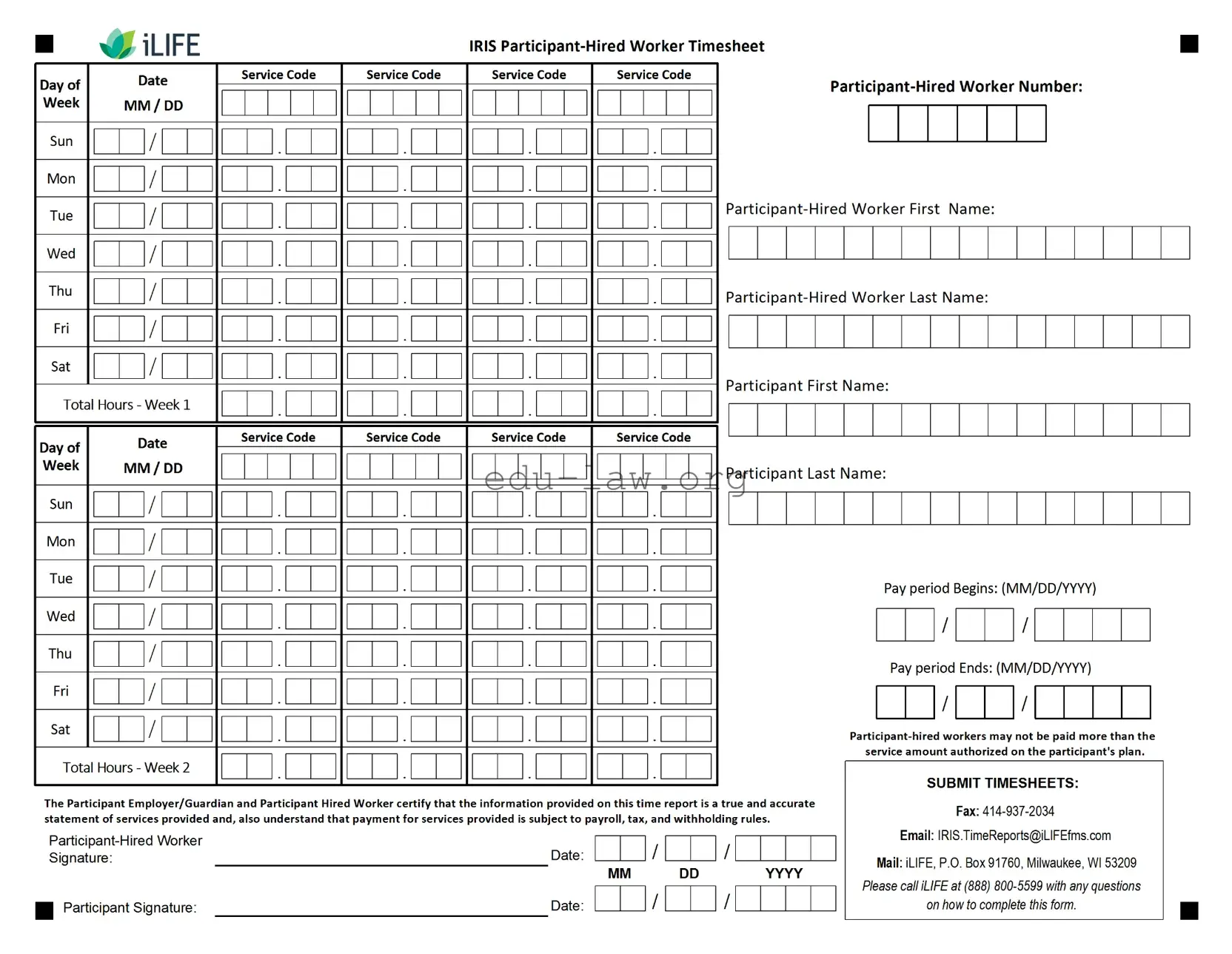
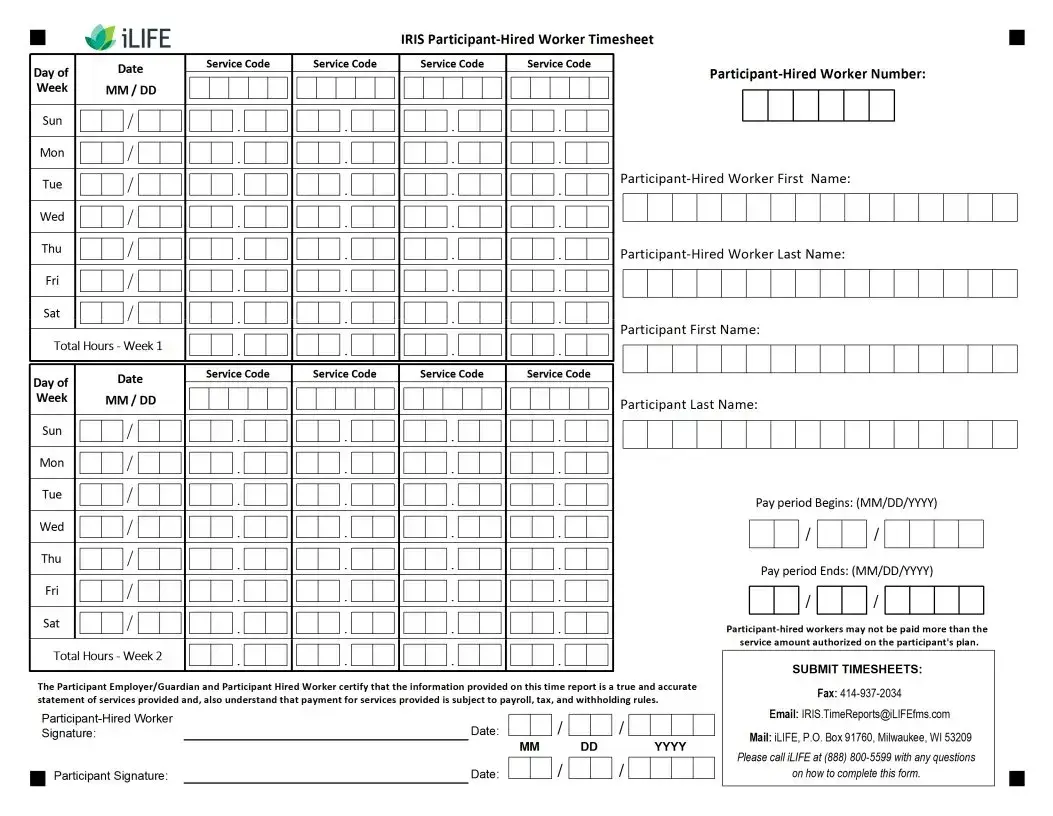
The Iris Worker Timesheet form serves as an essential tool for documenting hours worked by employees providing various services. It is designed to ensure accurate reporting and payment processing for each pay period. The form includes sections for entering the dates of service, total hours worked, and specific service codes that identify the type of care provided. Employees must sign the form, along with their employers, to validate the recorded information. Each pay period, workers are required to submit their timesheets by a specified due date to facilitate timely payment. The form also outlines guidelines regarding authorized work hours, emphasizing that any hours worked beyond the agreed limits do not guarantee payment. Clear instructions are provided for filling out the form, including the use of specific ink colors and the avoidance of pencil markings. Additionally, it contains a list of service abbreviations that help streamline the reporting process. Overall, the Iris Worker Timesheet form plays a crucial role in maintaining accurate records and ensuring that all parties involved are properly compensated for their services.
3/1 |
2.) |
.week the for |
.week the for (SHC) |
|
||
(Sunday, day that for |
(PC) column this in service |
column this in service |
|
|||
column this in service |
|
the for hours Total |
the for hours Total |
|
||
the for hours otalT |
|
|
|
|
|
|
.provided service next |
.provided service |
.workweek |
|
|||
for abbreviation Code |
for abbreviation Code |
that for Dates |
|
|||
|
|
|
|
Area Timesheet Sample |
||
.date pay the after days business (5) five until request payment stop a process to |
|
|||||
unable are We .mail the in check paper your receive to days business |
• |
|||||
|
|
|
|
).Friday other every be typically |
|
|
will (This .schedule payroll the on listed date due the by submitted be must Timesheets |
• |
|||||
|
|
.period pay each for employer participant each |
|
|||
for timesheet different a need will he/she participants, multiple for works employee |
|
|||||
an If .timesheet per period pay per employer/employee one only for hours Record |
• |
|||||
|
|
|
|
|
.schedule payroll |
|
the see dates, period pay For .timesheet per period pay one only for hours Record |
• |
|||||
.worked day last the after or on dated be must signatures Both .timesheet |
|
|||||
the date and sign must worker |
• |
|||||
|
|
.authorized those beyond worked hours any for |
|
|||
payment guarantee not does IRIS .hours authorized exceed not should worked Hours |
• |
|||||
|
|
|
|
|
Guidelines |
|
|
|
|
|
.Consultant IRIS your contact abbreviations, and types service of list full a For |
|
||
|
|
|
|
R |
|
Respite |
|
PC |
|
Care Personal |
|
C |
|
Chores - Care Home Supportive |
|
CC |
|
Care Companion - Care Home Supportive |
|
SS |
|
Supervision - Care Home Supportive |
|
SHC |
|
Routine - Care Home Supportive |
|
Abbreviation |
Type Service |
|
|
Timesheet |
|
|
|
|
|
|
|
|
|
Abbreviations Code Service Common |
|
|
|
|
|
|
|
|
|
|
|
|
|
|
|
||
|
|
414 |
|
|
|
53209 WI GlendaleBox:Road,DropBaker |
.N |
|
|
53209 WI Milwaukee, 91760, Box .O.P iLIFE, Mail: |
|
|
|
[email protected] Email: |
|
|
|
Submit to Ways |
|
INCORRECT |
û |
INCORRECT |
û |
ü |
|
|
|
CORRECT |
|
||
|
|
|
|
.them of outside |
|
extending or boxes the of sides the touching without possible as large as Write |
• |
||||
|
|
.pencil use not Do .only ink BLUE or BLACK in Write |
• |
||
|
|
|
|
Instructions Marking |
|
|
|
|
|
|
|
|
|
.date due the by iLIFE to timesheet the Submit .4 |
|||
|
|
|
|
.bottom) |
|
the (at timesheet the date and sign participant and worker |
|||||
|
|
|
.information requested all in Fill .a |
|
|
|
|
right): the (on area information worker/participant the In .2 |
|||
.Code Service each for worked hours total the write row, Hours Total the In .d |
|
||||
|
|
.column Code Service appropriate the |
|
||
in service each for worked hours of numbers total the write worked, day each For .c |
|
||||
|
|
|
|
.provided |
|
service each for abbreviation code service the write columns, Code Service the In .b |
|
||||
.period pay the of day each for dates the write column, Date the In .a |
|
||||
|
|
left): the (on area reporting time the In .1 |
|||
|
|
|
|
Instructions Timesheet |
|
| Fact Name | Description |
|---|---|
| Submission Deadline | Timesheets must be submitted by the payroll schedule's due date to ensure timely payment. |
| Payment Processing | After submission, please allow up to five business days to receive payment by check. |
| Signature Requirement | Both the participant and the employer must sign and date the timesheet for it to be valid. |
| Hours Worked | Hours recorded should not exceed the authorized limits as payment is not guaranteed for excess hours. |
| Multiple Participants | If an employee works for multiple participants, a separate timesheet is required for each one. |
| Service Abbreviations | Use specific abbreviations for types of service provided, such as "PC" for Personal Care and "SHC" for Supportive Home Care. |
| State-Specific Forms | Different states may have specific governing laws regarding timesheet submissions; check local regulations. |
| Contact Information | For questions or issues, contact the IRIS Consultant or submit inquiries via email to iLIFE. |
| Filling Instructions | Fill in all requested information clearly and use blue or black ink only; avoid using pencil. |
After gathering the necessary information, you can proceed to fill out the Iris Worker Timesheet form. This form requires specific details about the hours worked, the type of service provided, and the dates of service. Ensure you have a pen in blue or black ink ready to complete the form accurately.
What is the Iris Worker Timesheet form used for?
The Iris Worker Timesheet form is designed to document the hours worked by caregivers or service providers. It serves as an official record for the services rendered during a specific pay period. By accurately filling out this form, workers ensure they receive timely and correct payment for their services.
How do I complete the Iris Worker Timesheet form?
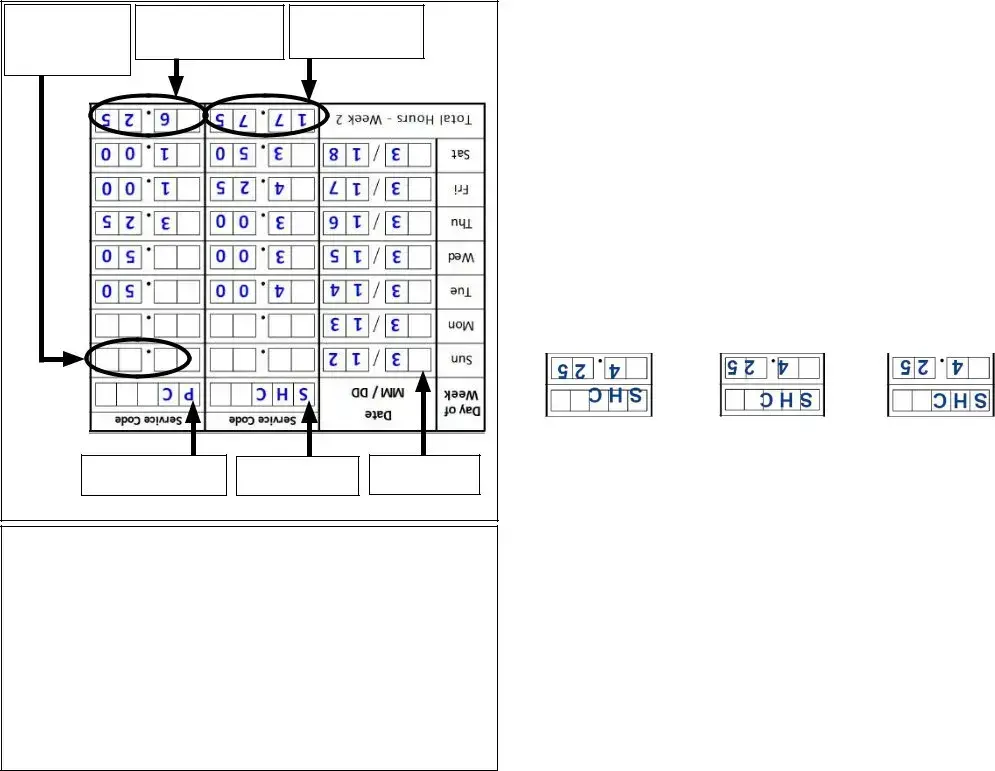
To complete the form, start by entering the date for each day worked in the designated column. Next, write the total hours worked for each service type in the corresponding rows. Be sure to use the correct service abbreviation codes. After filling in all the required information, both the worker and the employer must sign and date the timesheet to confirm its accuracy.
What should I do if I need to submit timesheets for multiple participants?
If you work for multiple participants, you will need to complete a separate timesheet for each one. Each timesheet should reflect the hours worked specifically for that participant during the pay period. This ensures that payments are processed accurately and appropriately for each individual.
When is the deadline for submitting the Iris Worker Timesheet?
Timesheets must be submitted by the due date listed on the payroll schedule. Typically, this date falls on a Friday, and it is important to allow at least five business days for processing. Late submissions may delay payment, so it is advisable to submit the timesheet as early as possible.
What happens if I exceed the authorized hours worked?
It is crucial to adhere to the authorized hours worked as exceeding them may result in payment not being guaranteed. The IRIS program does not authorize payment for hours worked beyond what has been approved. Always consult your IRIS consultant if you have questions about your hours or need clarification on guidelines.
What should I do if I make a mistake on the timesheet?
If you notice an error after submitting the timesheet, contact the appropriate office immediately to correct it. It is important to use ink in blue or black and avoid using pencil. Ensure that any corrections are clearly marked to avoid confusion. Keeping a copy of the submitted timesheet for your records can also help in tracking any discrepancies.
Using Incorrect Ink Color: It is essential to use only blue or black ink when filling out the Iris Worker Timesheet form. Using other colors, such as pencil or any other ink color, can lead to confusion and may result in the form being rejected.
Failing to Sign and Date: Both the worker and the employer participant must sign and date the timesheet. Omitting either signature can cause delays in processing and may prevent payment from being issued.
Incorrectly Filling Out Service Codes: Each service provided should be recorded with the correct abbreviation code in the designated columns. Errors in these codes can lead to misunderstandings about the services rendered and may affect payment.
Submitting After the Deadline: Timesheets must be submitted by the due date specified in the payroll schedule. Late submissions can result in payment delays, so it is crucial to adhere to the timeline provided.
The Iris Worker Timesheet form is an essential document for tracking hours worked by employees in various service roles. However, it is often accompanied by several other forms and documents that help streamline payroll processing and ensure compliance with employer requirements. Below is a list of these related documents, each serving a unique purpose.
Each of these documents plays a vital role in the overall management of employee records and payroll processes. By understanding their purposes, employees and employers can work together more effectively to ensure smooth operations and compliance with all necessary regulations.
The Iris Worker Timesheet form shares similarities with the Employee Time Card, which is commonly used in various workplaces to track hours worked by employees. Like the Iris form, the Employee Time Card requires workers to record their hours for each day worked within a specific pay period. This document typically includes sections for the employee’s name, the dates worked, and total hours, ensuring that the information is clear and organized for payroll processing. Both forms serve the purpose of documenting hours worked to facilitate accurate compensation.
Another document that resembles the Iris Worker Timesheet is the Weekly Timesheet. This form is often used by freelancers and contractors to log hours spent on various projects. Similar to the Iris form, the Weekly Timesheet includes sections for dates, daily hours, and a total for the week. The primary goal of both documents is to provide a comprehensive record of work hours to ensure timely and correct payment. They both emphasize the importance of accuracy in reporting hours worked.
The Biweekly Timesheet is also comparable to the Iris Worker Timesheet. Many organizations use this document to capture hours worked over a two-week period. Like the Iris form, it requires workers to detail their daily hours and includes a section for the total hours worked at the end of the period. This format allows for easier payroll processing and helps to streamline the payment cycle for employees, reflecting a similar structure and purpose as the Iris form.
The Payroll Register is another document that shares features with the Iris Worker Timesheet. This record is used by employers to summarize the total wages paid to employees for a specific pay period. While the Payroll Register does not require employees to fill it out, it relies on the information provided in timesheets like the Iris form. Both documents are essential for ensuring accurate payroll calculations and maintaining financial records for the employer.
The Job Time Sheet is a similar document often utilized in project-based work environments. It allows employees to record the time spent on specific tasks or projects, much like the Iris Worker Timesheet captures hours worked for various service types. Both documents aim to track labor hours effectively, ensuring that workers are compensated fairly for their time and that project budgets are adhered to.
The Project Time Log is another document that parallels the Iris Worker Timesheet. This log is typically used in project management to record the hours dedicated to different tasks within a project. Like the Iris form, it requires detailed entries for each day worked and emphasizes the importance of accurate time tracking. Both documents help in monitoring productivity and ensuring that project timelines and budgets are met.
Lastly, the Service Delivery Record is similar to the Iris Worker Timesheet in that it documents the hours spent providing specific services. This record is often used in healthcare and social services settings to track the time spent with clients. Both documents serve the purpose of maintaining a clear record of service hours, which is essential for billing and accountability. They highlight the need for accurate documentation in service-oriented roles.
When filling out the Iris Worker Timesheet form, it's important to follow certain guidelines to ensure accuracy and efficiency. Here’s a list of things you should and shouldn’t do:
Following these guidelines will help ensure that your timesheet is processed smoothly and accurately.
Misconceptions about the Iris Worker Timesheet form can lead to confusion and errors. Here are six common misunderstandings:
When filling out the Iris Worker Timesheet form, it is essential to follow specific guidelines to ensure accuracy and timely payment. Here are seven key takeaways:
Following these guidelines will help ensure that the timesheet is completed correctly and payments are processed without issues.