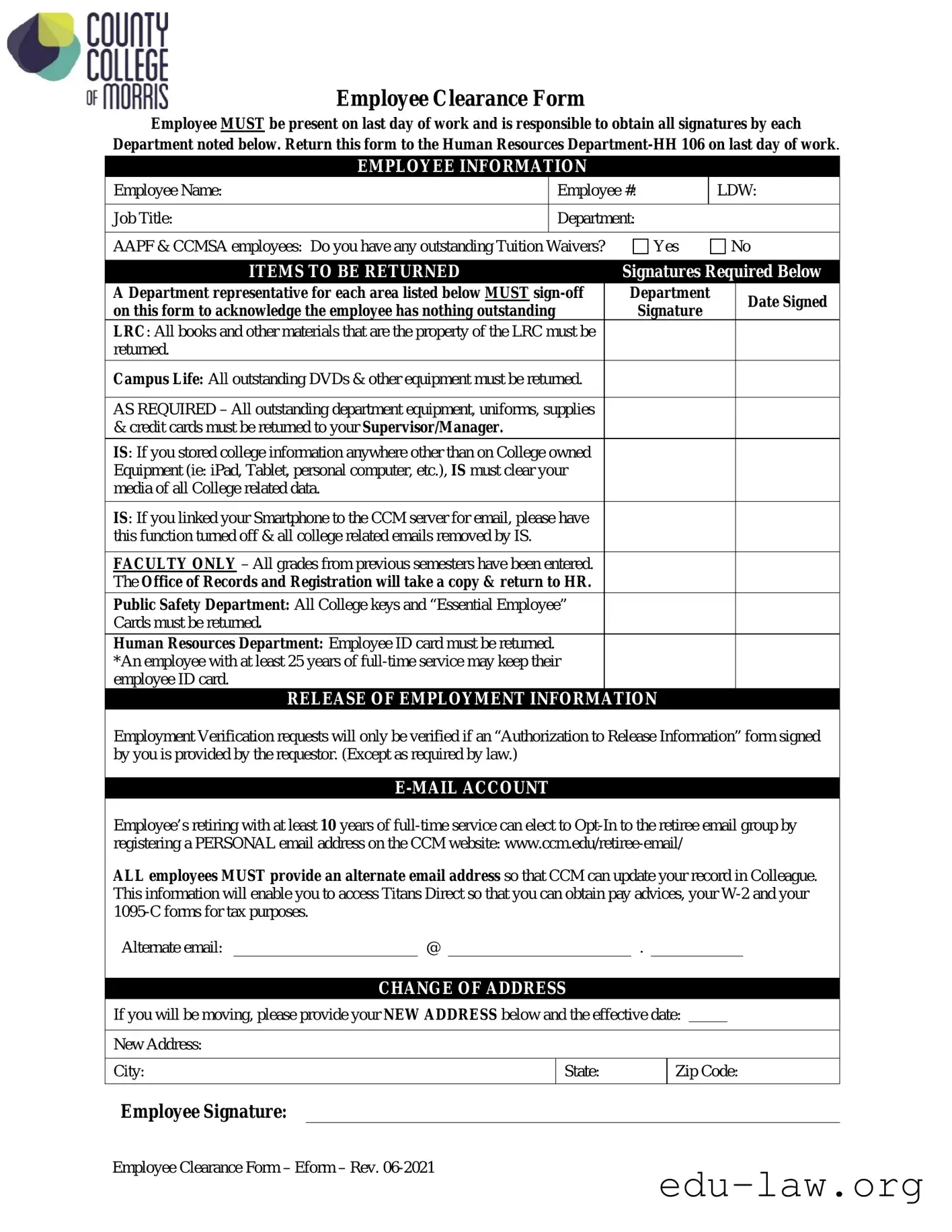
The Employee Clearance Form serves as a crucial document for employees preparing to leave their positions. On the last day of work, employees must be present to obtain necessary signatures from various departments, ensuring all company property and responsibilities are addressed. This includes returning items such as books, equipment, uniforms, and keys. Specific departments, like the Library Resource Center and Campus Life, have distinct requirements for the return of their materials. Additionally, employees must ensure that any college-related data stored on personal devices is cleared by the Information Services department. Faculty members have the added responsibility of confirming that all grades have been submitted. The form also addresses the return of the employee ID card, with exceptions for those with 25 years of service. Employees must provide an alternate email address for future correspondence and tax document access. Lastly, any change of address should be documented to keep records current. Completing this form is essential for a smooth transition out of the organization.

Employee Clearance Form
Employee MUST be present on last day of work and is responsible to obtain all signatures by each
Department noted below. Return this form to the Human Resources
EMPLOYEE INFORMATION
|
Employee Name: |
|
Employee #: |
|
LDW: |
||||
|
|
|
|
|
|
|
|
|
|
|
Job Title: |
|
Department: |
|
|
|
|||
|
|
|
|
|
|
|
|
|
|
|
AAPF & CCMSA employees: Do you have any outstanding Tuition Waivers? |
|
Yes |
No |
|||||
|
|
|
|
|
|
|
|||
|
ITEMS TO BE RETURNED |
|
|
Signatures Required Below |
|
||||
|
A Department representative for each area listed below MUST |
|
Department |
|
Date Signed |
||||
|
on this form to acknowledge the employee has nothing outstanding |
|
|
Signature |
|
||||
|
|
|
|
|
|
||||
|
LRC: All books and other materials that are the property of the LRC must be |
|
|
|
|
|
|
||
returned. |
|
|
|
|
|
|
|
||
|
Campus Life: All outstanding DVDs & other equipment must be returned. |
|
|
|
|
|
|
||
|
|
|
|
|
|
|
|
||
|
AS REQUIRED – All outstanding department equipment, uniforms, supplies |
|
|
|
|
|
|
||
|
& credit cards must be returned to your Supervisor/Manager. |
|
|
|
|
|
|
|
|
|
IS: If you stored college information anywhere other than on College owned |
|
|
|
|
|
|
||
|
Equipment (ie: iPad, Tablet, personal computer, etc.), IS must clear your |
|
|
|
|
|
|
||
|
media of all College related data. |
|
|
|
|
|
|
|
|
|
IS: If you linked your Smartphone to the CCM server for email, please have |
|
|
|
|
|
|
||
|
this function turned off & all college related emails removed by IS. |
|
|
|
|
|
|
|
|
|
|
|
|
|
|
|
|
||
|
FACULTY ONLY – All grades from previous semesters have been entered. |
|
|
|
|
|
|
||
|
The Office of Records and Registration will take a copy & return to HR. |
|
|
|
|
|
|
||
|
Public Safety Department: All College keys and “Essential Employee” |
|
|
|
|
|
|
||
|
Cards must be returned. |
|
|
|
|
|
|
|
|
|
Human Resources Department: Employee ID card must be returned. |
|
|
|
|
|
|
|
|
|
*An employee with at least 25 years of |
|
|
|
|
|
|
||
|
employee ID card. |
|
|
|
|
|
|
|
|
|
RELEASE OF EMPLOYMENT INFORMATION |
|
|
|
|||||
Employment Verification requests will only be verified if an “Authorization to Release Information” form signed by you is provided by the requestor. (Except as required by law.)
Employee’s retiring with at least 10 years of
ALL employees MUST provide an alternate email address so that CCM can update your record in Colleague. This information will enable you to access Titans Direct so that you can obtain pay advices, your
Alternate email:@.
CHANGE OF ADDRESS
If you will be moving, please provide your NEW ADDRESS below and the effective date:
New Address:
City: |
State: |
Zip Code: |
|
|
|
Employee Signature:
Employee Clearance Form – Eform – Rev.
| Fact Name | Details |
|---|---|
| Employee Presence Required | The employee must be present on their last day of work to complete the clearance process. |
| Signature Responsibility | It is the employee's responsibility to obtain signatures from each department listed on the form. |
| Return Location | The completed form must be returned to the Human Resources Department, located in HH 106. |
| Items to be Returned | Employees must return all items such as books, equipment, uniforms, and college keys to the respective departments. |
| Employment Verification | Requests for employment verification require an "Authorization to Release Information" form signed by the employee. |
| Email Account Management | Employees retiring with at least 10 years of service can opt-in to the retiree email group using a personal email address. |
| Change of Address Notification | Employees must provide their new address and effective date if they are moving, ensuring records are updated. |
Completing the Employee Clearance form is essential for ensuring a smooth transition on your last day of work. After filling out the form, you will need to obtain signatures from various departments to confirm that all items have been returned and obligations fulfilled. Finally, return the completed form to the Human Resources Department.
What is the purpose of the Employee Clearance Form?
The Employee Clearance Form is designed to ensure that all employees return any college property and settle any outstanding matters before their last day of work. It serves as a checklist for both the employee and the college departments involved, confirming that all responsibilities have been fulfilled.
Who needs to sign the Employee Clearance Form?
Each department listed on the form must provide a signature. This includes representatives from the Learning Resource Center (LRC), Campus Life, your immediate Supervisor or Manager, Information Services (IS), Public Safety, and the Human Resources Department. Each signature indicates that the employee has returned all necessary items and has no outstanding obligations.
What items must be returned before the last day of work?
Employees are required to return all items specific to their departments. This includes books and materials from the LRC, DVDs and equipment from Campus Life, uniforms and supplies from your department, and any keys or identification cards from Public Safety. Additionally, if you have linked personal devices to college servers, IS must ensure that all college-related data is removed.
What happens if I have outstanding Tuition Waivers?
If you are an AAPF or CCMSA employee with outstanding Tuition Waivers, you must address this before your clearance can be finalized. It is important to resolve any issues related to tuition waivers to avoid complications during your exit process.
Can I keep my employee ID card?
Employees who have served at least 25 years in a full-time capacity may keep their employee ID card. If you do not meet this criterion, you will need to return your ID card to the Human Resources Department on your last day of work.
How can I access my employment verification after leaving?
What should I do if I want to maintain an email account after retirement?
If you are retiring with at least 10 years of full-time service, you have the option to join the retiree email group. To do this, you must register a personal email address on the college's website. This will allow you to stay connected with the college community.
Why do I need to provide an alternate email address?
Providing an alternate email address is crucial for maintaining your records in the college's system. This will ensure that you can access important documents such as pay advices, W-2 forms, and 1095-C forms for tax purposes after your departure.
What should I do if I am moving after my employment ends?
If you plan to move, please fill out your new address and the effective date on the clearance form. Keeping your contact information up-to-date ensures that you receive any necessary communications from the college in the future.
Failing to sign the form. An unsigned form will not be accepted.
Not being present on the last day of work. Employees must be present to obtain necessary signatures.
Overlooking the requirement to return all items. Ensure that all materials, keys, and equipment are returned.
Neglecting to check for outstanding Tuition Waivers. This is specifically required for AAPF & CCMSA employees.
Forgetting to provide an alternate email address. This is essential for future communications and access to tax documents.
Not informing about a change of address. Provide your new address if you plan to move.
Skipping the sign-off from department representatives. Each department must acknowledge that there are no outstanding items.
Failing to clear personal devices of college data. This includes ensuring no college-related information remains on personal devices.
Not checking if all grades have been entered if you are a faculty member. This is crucial for the Office of Records and Registration.
The Employee Clearance Form is an important document that ensures employees return all company property and complete necessary procedures before leaving their position. Several other forms and documents often accompany this clearance process. Here is a list of these additional documents, each serving a specific purpose.
These forms and documents are essential for a smooth transition when an employee leaves a position. They help ensure that all company policies are followed and that both the employee and employer have a clear understanding of their responsibilities during the clearance process.
The Exit Interview form serves a similar purpose to the Employee Clearance Form. Both documents are used during the employee's final days at an organization. The Exit Interview form typically gathers feedback from the departing employee regarding their experience at the company. This feedback can be valuable for improving workplace conditions and practices. Like the Employee Clearance Form, it requires the employee's presence and may involve discussions with various departments to ensure all aspects of the departure are addressed.
The Final Paycheck Authorization form is another document that shares similarities with the Employee Clearance Form. This form ensures that the employee's final paycheck is processed correctly and that any deductions, such as for unreturned equipment, are accounted for. Both forms require the employee's active participation in the process. They help to ensure that all financial obligations are settled before the employee officially leaves the organization.
The Benefits Termination form is also akin to the Employee Clearance Form. This document outlines the termination of employee benefits upon departure, including health insurance and retirement plans. Employees must complete this form to confirm their understanding of the implications of their departure on their benefits. Just as with the Employee Clearance Form, it serves to clarify responsibilities and ensure that all necessary steps are taken before the employee's last day.
The Return of Company Property form is closely related as well. This document specifically lists all items that must be returned to the employer, such as laptops, keys, or uniforms. Similar to the Employee Clearance Form, it requires signatures from department representatives to confirm that all items have been returned. This process helps protect the company’s assets and ensures that the departing employee has fulfilled their obligations.
The Non-Disclosure Agreement (NDA) Release form is another document that resembles the Employee Clearance Form. This form may be required to confirm that the employee understands their ongoing obligations regarding confidentiality even after leaving the organization. Both forms aim to protect the interests of the organization while ensuring that the departing employee is aware of their responsibilities moving forward.
The Tax Information Update form is relevant as well. This document allows the employee to provide updated information for tax purposes, such as a new address or alternate email. Similar to the Employee Clearance Form, it ensures that the organization has accurate information for processing final tax documents. This step is crucial for the employee's financial records and future correspondence regarding tax filings.
The Reference Request Authorization form also shares similarities with the Employee Clearance Form. This document allows the employee to authorize the release of their employment information to potential future employers. Both forms require the employee's consent and help facilitate a smooth transition from one job to another. They ensure that the employee's rights are respected while providing necessary information to interested parties.
Lastly, the Employee Exit Checklist is comparable to the Employee Clearance Form. This checklist outlines all the steps an employee must take before leaving, including returning equipment and settling any outstanding obligations. It serves as a comprehensive guide to ensure that nothing is overlooked during the departure process. Like the Employee Clearance Form, it emphasizes the importance of completing all necessary tasks before the employee's final day at the organization.
When filling out the Employee Clearance form, it is essential to follow specific guidelines to ensure a smooth process. Here are five things you should and shouldn't do:
Misconceptions about the Employee Clearance Form can lead to confusion and frustration during the offboarding process. Here are five common misunderstandings:
Understanding these misconceptions can help ensure a smoother transition for employees as they complete their clearance process.
Filling out the Employee Clearance form is an important step for employees preparing to leave their position. Here are some key takeaways to keep in mind:
Understanding these key points can help ensure a smooth transition as you complete your employment with the organization.