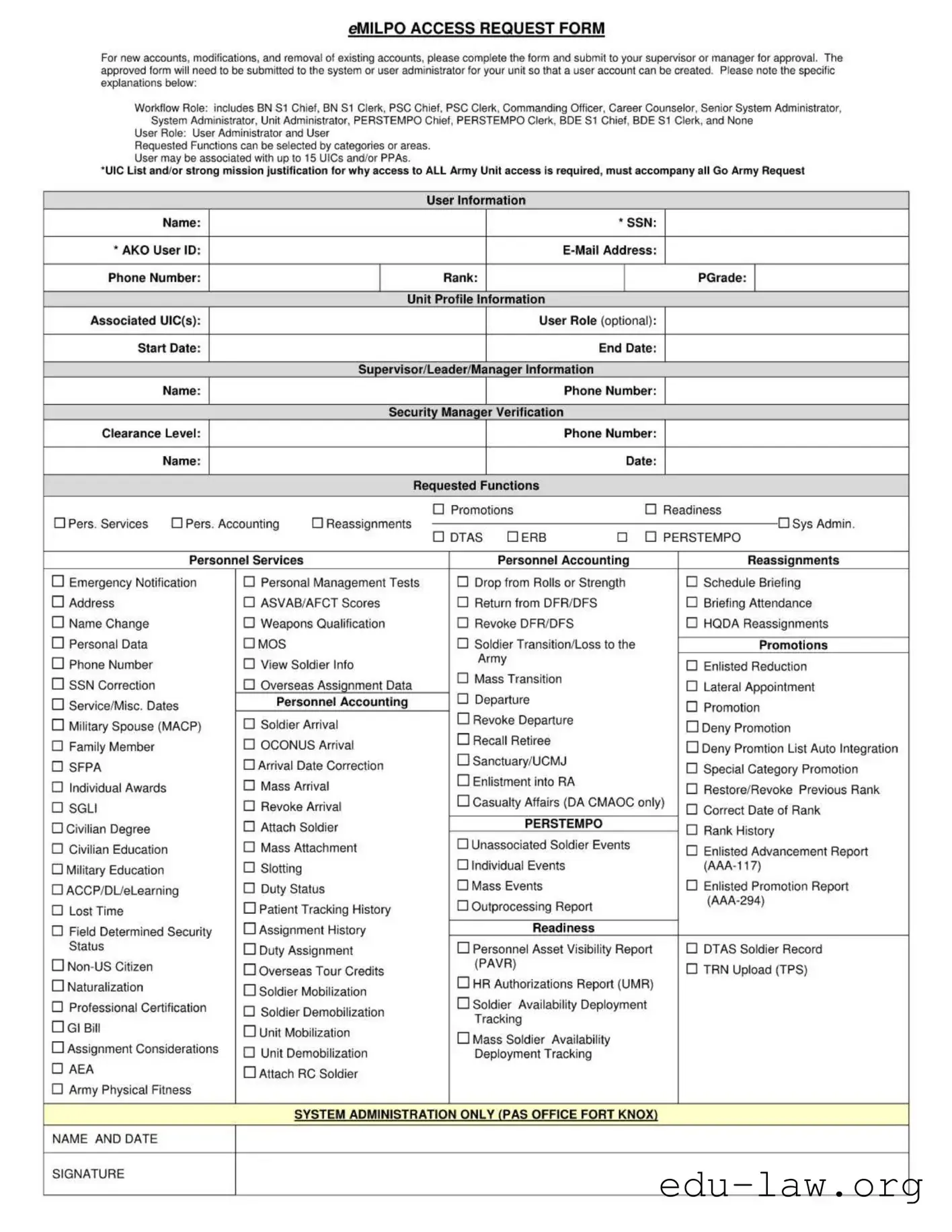
The eMILPO Access Request Form serves as a crucial tool for managing user accounts within the Army's personnel management system. This form is designed for various purposes, including the creation of new accounts, modifications to existing accounts, and the removal of accounts that are no longer needed. To initiate the process, individuals must complete the form and submit it to their supervisor or manager for approval. Once approved, the form must be forwarded to the system or user administrator specific to the unit, facilitating the account creation process. The form outlines several important components, such as workflow roles that include positions like BN S1 Chief, PSC Chief, and Commanding Officer, among others. Additionally, it allows users to select functions based on categories, ensuring that access aligns with their responsibilities. Users can be associated with up to 15 Unit Identification Codes (UICs) and/or Program Participation Areas (PPAs), necessitating a strong justification for broader access requests. Personal information such as name, Social Security Number (SSN), and contact details are required, alongside details regarding associated UICs and the desired user role. The form also includes sections for security verification and a comprehensive list of requested functions, ranging from promotions and personnel services to more specialized tasks like casualty affairs and deployment tracking. By understanding the structure and requirements of the eMILPO Access Request Form, personnel can ensure compliance and efficiency in managing their access to essential Army resources.
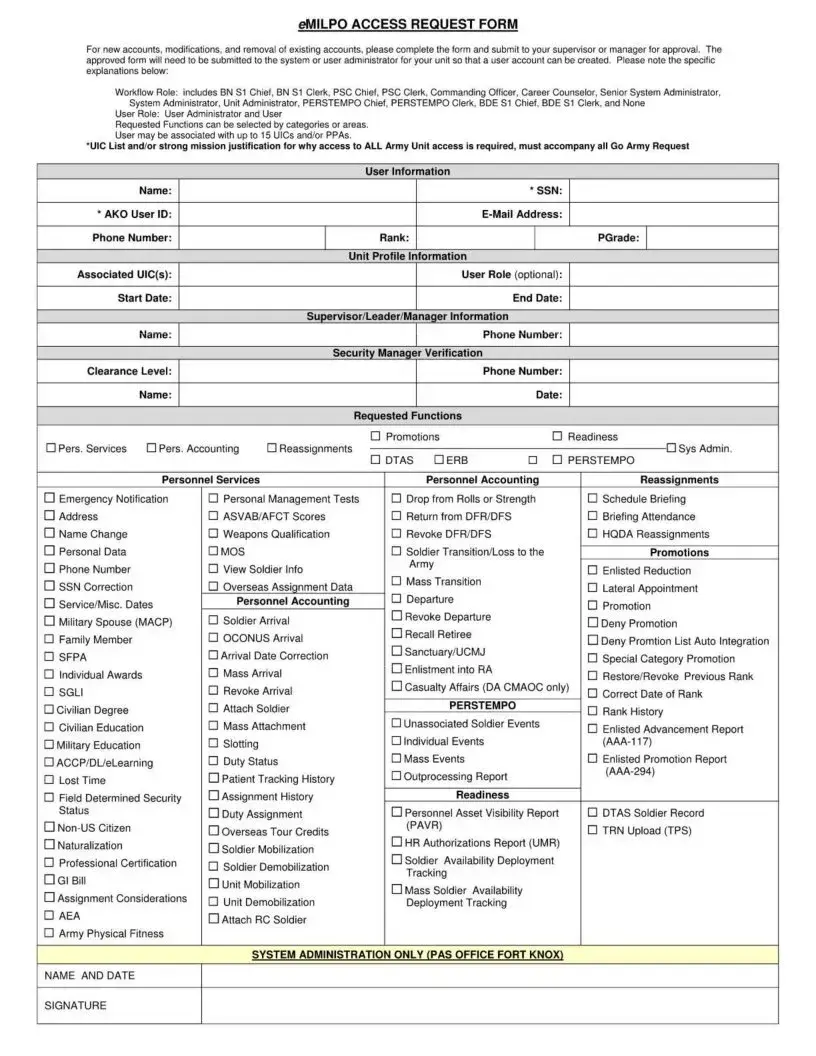
eMILPO ACCESS REQUEST FORM
For new accounts, modifications, and removal of existing accounts, please complete the form and submit to your supervisor or manager for approval. The approved form will need to be submitted to the system or user administrator for your unit so that a user account can be created. Please note the specific explanations below:
Workflow Role: includes BN S1 Chief, BN S1 Clerk, PSC Chief, PSC Clerk, Commanding Officer, Career Counselor, Senior System Administrator, System Administrator. Unit Administrator, PERSTEMPO Chief, PERSTEMPO Clerk, BDE S1 Chief, BDE S1 Clerk, and None
User Role: User Administrator and User
Requested Functions can be selected by categories or areas. User may be associated with up to 15 UICs and/or PPAs.
*UIC List and/or strong mission justification for why access to ALL Army Unit access is required, must accompany all Go Army Request
User Information
|
Name: |
|
* SSN: |
|
* AKO User ID: |
|
|
||
Phone Number: |
Rank: |
|
PGrade: |
|
|
|
Unit Profile Information |
|
|
Associated UIC(s): |
|
User Role (optional): |
|
|
Start Date: |
|
End Date: |
|
|
|
|
Supervisor/Leader/Manager Information |
|
|
|
Name: |
|
Phone Number: |
|
|
|
Security Manager Verification |
|
|
Clearance Level: |
|
Phone Number: |
|
|
|
Name: |
|
Date: |
|
|
|
Requested Functions |
|
|
Pers. Services |
Pers. Accounting |
Promotions |
|
Readiness |
Reassignments |
Sys Admin. |
|||
|
|
DTAS |
ERB |
PERSTEMPO |
Personnel Services
Emergency Notification |
Personal Management Tests |
|
Address |
ASVAB/AFCT Scores |
|
Name Change |
Weapons Qualification |
|
Personal Data |
MOS |
|
Phone Number |
View Soldier Info |
|
SSN Correction |
Overseas Assignment Data |
|
Service/Misc. Dates |
Personnel Accounting |
|
Military Spouse (MACP) |
Soldier Arrival |
|
Family Member |
OCONUS Arrival |
|
SFPA |
Arrival Date Correction |
|
Individual Awards |
Mass Arrival |
|
SGLI |
Revoke Arrival |
|
Civilian Degree |
Attach Soldier |
|
Civilian Education |
Mass Attachment |
|
Military Education |
Slotting |
|
ACCP/DL/eLearning |
Duty Status |
|
Lost Time |
Patient Tracking History |
|
Field Determined Security |
Assignment History |
|
Status |
Duty Assignment |
|
Overseas Tour Credits |
||
Naturalization |
||
Soldier Mobilization |
||
|
||
Professional Certification |
Soldier Demobilization |
|
Gl Bill |
||
Unit Mobilization |
||
Assignment Considerations |
||
Unit Demobilization |
||
AEA |
||
Attach RC Soldier |
||
Army Physical Fitness |
|
Personnel Accounting
Drop from Rolls or Strength
Return from DFR/DFS
Revoke DFR/DFS
Soldier Transition/Loss to the Army
Mass Transition
Departure
Revoke Departure
Recall Retiree
Sanctuary/UCMJ
Enlistment into RA
Casualty Affairs (DA CMAOC only)
PERSTEMPO
Unassociated Soldier Events
Individual Events
Mass Events
Outprocessing Report
Readiness
Personnel Asset Visibility Report (PAVR)
HR Authorizations Report (UMR)
Soldier Availability Deployment Tracking
Mass Soldier Availability
Deployment Tracking
Reassignments
Schedule Briefing
Briefing Attendance
HQDA Reassignments
Promotions
Enlisted Reduction
Lateral Appointment
Promotion
Deny Promotion
Deny Promtion List Auto Integration
Special Category Promotion
Restore/Revoke Previous Rank
Correct Date of Rank
Rank History
Enlisted Advancement Report
Enlisted Promotion Report
DTAS Soldier Record
TRN Upload (TPS)
SYSTEM ADMINISTRATIO N ONLY (PAS OFFICE FORT KNOX)
NAME AND DATE
SIGNATURE
| Fact Name | Description |
|---|---|
| Purpose | The eMILPO Access Request Form is used for creating, modifying, or removing user accounts within the eMILPO system. |
| Submission Process | Users must complete the form and submit it to their supervisor or manager for approval before it can be processed. |
| Approval Requirement | Once approved, the form must be submitted to the system or user administrator for account creation. |
| Workflow Roles | Roles include various positions such as BN S1 Chief, PSC Clerk, and Commanding Officer, among others. |
| User Roles | Users can select functions based on categories, and they may be associated with up to 15 UICs or PPAs. |
| Required Information | Users must provide personal details such as name, SSN, AKO User ID, email, and phone number. |
| Security Verification | A security manager must verify the clearance level and provide their contact information on the form. |
| Functions Requested | Users can request various functions, including promotions, personnel services, and emergency notifications. |
| Governing Laws | Access and usage of the eMILPO system are governed by Army regulations and policies related to personnel management. |
After completing the Emilpo Request form, it must be submitted to your supervisor or manager for approval. Once approved, the form will be forwarded to the system or user administrator for account creation. Follow these steps to ensure the form is filled out correctly.
What is the purpose of the Emilpo Request form?
The Emilpo Request form is designed for creating, modifying, or removing user accounts within the eMILPO system. It ensures that all requests are properly documented and approved before any changes are made to user access.
Who needs to approve the Emilpo Request form?
The form must be submitted to your supervisor or manager for approval. Their approval is necessary before the form can be forwarded to the system or user administrator for processing.
What information is required on the form?
Essential information includes your name, SSN, AKO User ID, email address, phone number, rank, and PGrade. Additionally, you must provide associated UICs, user role, and supervisor information, including their clearance level and contact details.
Can I request access for multiple UICs?
Yes, you may be associated with up to 15 UICs and/or PPAs. However, a strong mission justification must accompany requests for access to all Army Unit access.
What are the user roles I can select?
User roles include various positions such as BN S1 Chief, BN S1 Clerk, PSC Chief, and others. You can choose a role that best fits your responsibilities within the unit.
What functions can I request access to?
The form allows you to request access to a variety of functions, including promotions, personnel services, and emergency notifications. A detailed list of functions is provided on the form.
What should I do if I need to change my personal data?
If you need to update personal data such as your name or phone number, you can indicate this on the Emilpo Request form. Ensure that you provide accurate information to avoid processing delays.
Is there a specific format for the associated UIC list?
While the form does not specify a format for the UIC list, it is important that the list is clear and easy to read. Ensure that all UICs are listed accurately to facilitate the request process.
What happens after I submit the approved form?
Once the form is approved by your supervisor or manager, it should be submitted to the system or user administrator for your unit. They will process the request and create or modify your user account as necessary.
Who do I contact if I have questions about the Emilpo Request form?
If you have questions or need assistance with the form, it is recommended to contact your supervisor or the user administrator for guidance. They can provide clarification and support throughout the process.
Missing Required Information: One of the most common mistakes is failing to fill out all the required fields, such as Name, SSN, and AKO User ID. Omitting any of these can lead to delays or rejection of the request.
Incorrect User Role Selection: Selecting the wrong user role can complicate the approval process. Make sure to choose the appropriate role that aligns with your duties.
Not Providing Justification: When requesting access to multiple UICs or PPAs, it’s crucial to include a strong mission justification. Without this, your request may not be approved.
Inaccurate Contact Information: Double-check your phone number and email address. Incorrect contact details can hinder communication regarding your request.
Skipping Supervisor Approval: Always submit the form to your supervisor or manager for approval. Failing to do so can result in the form being rejected outright.
Neglecting Security Manager Verification: Ensure that the security manager’s verification is completed, including the clearance level. This step is essential for processing your request.
Not Reviewing the Completed Form: Before submitting, take a moment to review the entire form. Small errors can lead to significant delays. A thorough check can save you time in the long run.
The eMILPO Access Request Form is a critical document for managing user accounts within the military personnel system. Along with this form, several other documents are commonly utilized to ensure a smooth and efficient process. Each of these documents plays a specific role in supporting the request for access and maintaining accurate records. Below is a list of these documents, along with brief descriptions of their purposes.
Each of these documents contributes to a comprehensive process for managing access within the eMILPO system. Ensuring that all necessary forms are completed and submitted helps maintain security and efficiency in personnel management.
The eMILPO Access Request Form is similar to the User Access Request Form commonly used in many organizations. Both documents serve the purpose of granting access to specific systems or data. They require details about the requester, including their role and the level of access needed. This ensures that only authorized personnel can gain entry, maintaining the security of sensitive information.
Another comparable document is the IT Access Request Form. Like the eMILPO form, this document is used to request access to various IT systems. It typically includes sections for user identification, purpose of access, and supervisor approval. The IT Access Request Form helps organizations track who has access to what, promoting accountability and security.
The Personnel Action Request Form also shares similarities with the eMILPO Access Request Form. Both forms are utilized to manage personnel changes, such as new hires or role modifications. They require the submission of relevant information, including employee details and the nature of the request, ensuring that all personnel actions are documented and approved by the appropriate authorities.
The Security Clearance Application is another document that resembles the eMILPO form. Both are essential for maintaining security protocols within an organization. The Security Clearance Application requires personal information and justification for access to classified information, similar to how the eMILPO form requires justification for access to Army unit data.
The Change of Status Form is akin to the eMILPO Access Request Form as it is used to notify changes in an employee's status within an organization. This document typically requires details about the individual and the nature of the change, ensuring that all updates are formally recorded and approved by management.
The New Employee Onboarding Form is similar in that it collects vital information about new hires. Both forms require personal details and supervisor approval. The onboarding form ensures that new employees receive the necessary access and resources to perform their roles effectively, just as the eMILPO form does for Army personnel.
The Access Control List (ACL) Request Form is another document that functions similarly. It is used to request specific access rights to systems or files. The ACL Request Form outlines the user’s role and the level of access needed, much like the eMILPO form, which categorizes user roles and functions for Army personnel.
The Incident Report Form can also be compared to the eMILPO Access Request Form. While the focus is different, both documents require detailed information and often need managerial approval. The Incident Report Form documents security breaches or issues, ensuring that appropriate actions are taken, similar to how the eMILPO form tracks access requests for security purposes.
The Training Request Form is similar in that it requires information about the requester and the training needed. Both forms ensure that proper approvals are obtained before any changes are made. The Training Request Form helps organizations manage employee development, while the eMILPO form manages access to critical Army systems.
Lastly, the Leave Request Form shares similarities with the eMILPO Access Request Form. Both documents require personal information and approval from a supervisor. The Leave Request Form documents an employee's request for time off, ensuring that all requests are formally processed and approved, just like the access requests in the eMILPO form.
When filling out the eMILPO Request form, it is essential to approach the task with care and attention to detail. Here are five important do's and don'ts to consider:
Understanding the eMILPO Request Form is crucial for effective management of personnel accounts. However, several misconceptions can lead to confusion. Here are six common misconceptions about the form:
By addressing these misconceptions, users can navigate the eMILPO Request Form more effectively and ensure compliance with the required procedures.
When filling out the eMILPO Request form, consider the following key points:
Following these guidelines will help streamline the request process and ensure that the necessary approvals are obtained efficiently.