The CMS 855A form plays a crucial role in the Medicare enrollment process for institutional providers, enabling them to apply for or update their enrollment information. This application is specifically designed for various healthcare organizations, including hospitals, skilled nursing facilities, and community mental health centers, among others. By completing the CMS 855A, providers can initiate their enrollment in the Medicare program or report necessary changes to their existing enrollment data. It’s important to note that changes must be reported within specified timeframes—90 days for general updates and 30 days for changes in ownership or control. The form requires detailed information, including the provider's National Provider Identifier (NPI), which is essential for billing Medicare. Additionally, applicants must ensure they include all required supporting documentation to avoid delays in the approval process. The journey from application submission to receiving Medicare billing privileges involves several steps, including reviews by fee-for-service contractors and state agencies, culminating in a final decision by the CMS Regional Office. Understanding the intricacies of the CMS 855A form is vital for healthcare organizations aiming to navigate the complexities of Medicare enrollment effectively.
MEDICARE ENROLLMENT APPLICATION
INSTITUTIONAL PROVIDERS
SEE PAGE 1 TO DETERMINE IF YOU ARE COMPLETING THE CORRECT APPLICATION
SEE PAGE 3 FOR INFORMATION ON WHERE TO MAIL THIS APPLICATION.
SEE PAGE 52 TO FIND A LIST OF THE SUPPORTING DOCUMENTATION THAT MUST BE SUBMITTED WITH THIS APPLICATION.
DEPARTMENT OF HEALTH AND HUMAN SERVICES |
Form Approved |
CENTERS FOR MEDICARE & MEDICAID SERVICES |
OMB No. |
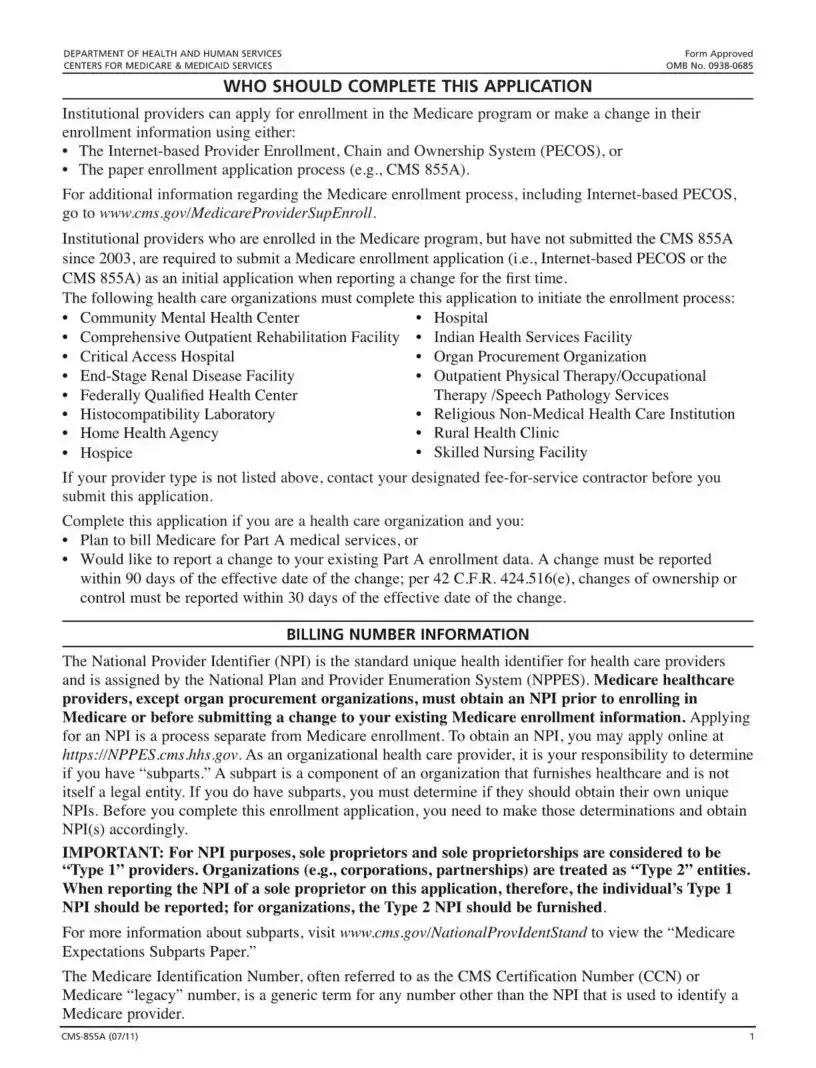
WHO SHOULD COMPLETE THIS APPLICATION
Institutional providers can apply for enrollment in the Medicare program or make a change in their enrollment information using either:
•The
•The paper enrollment application process (e.g., CMS 855A).
For additional information regarding the Medicare enrollment process, including
go to www.cms.gov/MedicareProviderSupEnroll.
Institutional providers who are enrolled in the Medicare program, but have not submitted the CMS 855A
г2003, are required to submit a Medicare enrollment application (i.e.,
following health care organizations must complete this application to initiate the enrollment process:
• |
Community Mental Health Center |
• |
Hospital |
• Comprehensive Outpatient Rehabilitation Facility • Indian Health Services Facility |
|||
• |
Critical Access Hospital |
• |
Organ Procurement Organization |
• |
• |
Outpatient Physical Therapy/Occupational |
|
• |
Federally Qualified Health Center |
|
Therapy /Speech Pathology Services |
• |
Histocompatibility Laboratory |
• |
Religious |
• |
Home Health Agency |
• |
Rural Health Clinic |
• |
Hospice |
• |
Skilled Nursing Facility |
If your provider type is not listed above, contact your designated
Complete this application if you are a health care organization and you:
•Plan to bill Medicare for Part A medical services, or
•Would like to report a change to your existing Part A enrollment data. A change must be reported within 90 days of the effective date of the change; per 42 C.F.R. 424.516(e), changes of ownership or control must be reported within 30 days of the effective date of the change.
BILLING NUMBER INFORMATION
The National Provider Identifier (NPI) is the standard unique health identifier for health care providers and is assigned by the National Plan and Provider Enumeration System (NPPES). Medicare healthcare
providers, except organ procurement organizations, must obtain an NPI prior to enrolling in Medicare or before submitting a change to your existing Medicare enrollment information. Applying
for an NPI is a process separate from Medicare enrollment. To obtain an NPI, you may apply online at https://NPPES.cms.hhs.gov. As an organizational health care provider, it is your responsibility to determine if you have “subparts.'' A subpart is a component of an organization that furnishes healthcare and is not itself a legal entity. If you do have subparts, you must determine if they should obtain their own unique NPIs. Before you complete this enrollment application, you need to make those determinations and obtain NPl(s) accordingly.
IMPORTANT: For NPI purposes, sole proprietors and sole proprietorships are considered to be
“Type 1” providers. Organizations (e.g., corporations, partnerships) are treated as “Type 2” entities. When reporting the NPI of a sole proprietor on this application, therefore, the individual’s Type 1 NPI should be reported; for organizations, the Type 2 NPI should be furnished.
For more information about subparts, visit www.cms.gov/NationalProvldentStand to view the “Medicare
Expectations Subparts Paper.”
The Medicare Identification Number, often referred to as the CMS Certification Number (CCN) or Medicare “legacy” number, is a generic term for any number other than the NPI that is used to identify a Medicare provider.
1 |
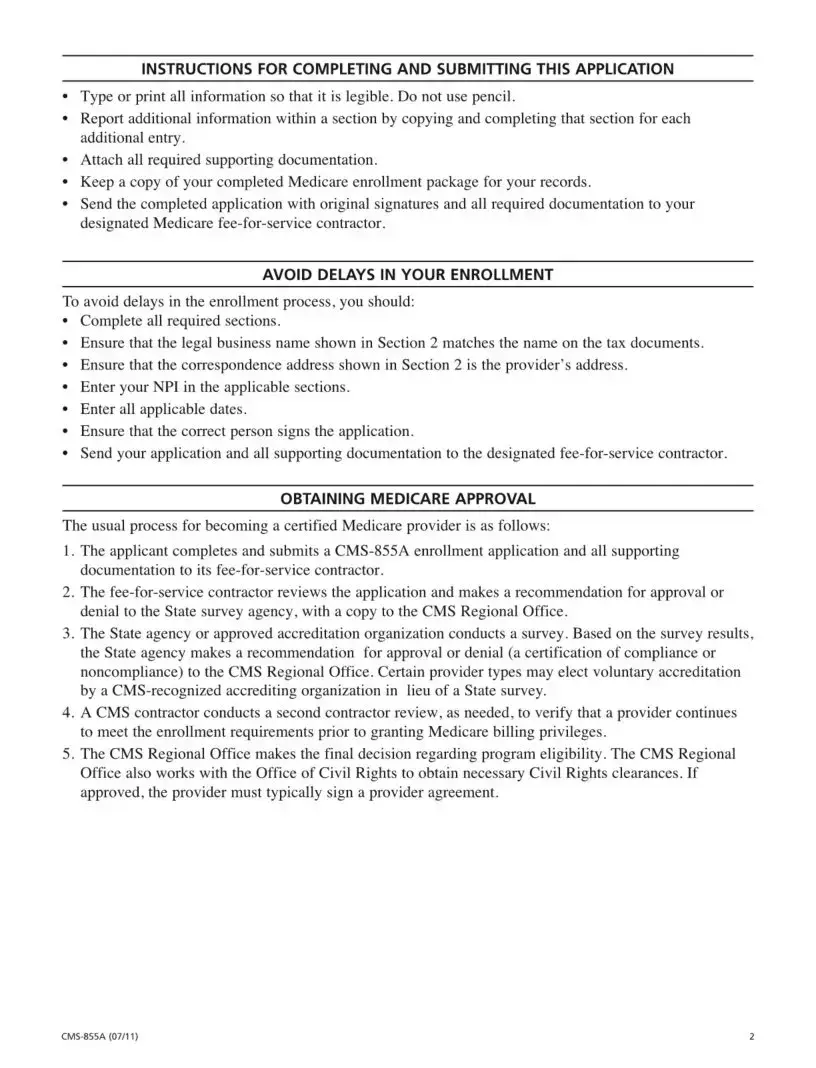
INSTRUCTIONS FOR COMPLETING AND SUBMITTING THIS APPLICATION
•Type or print all information so that it is legible. Do not use pencil.
•Report additional information within a section by copying and completing that section for each additional entry.
•Attach all required supporting documentation.
•Keep a copy of your completed Medicare enrollment package for your records.
•Send the completed application with original signatures and all required documentation to your designated Medicare
AVOID DELAYS IN YOUR ENROLLMENT
To avoid delays in the enrollment process, you should:
•Complete all required sections.
•Ensure that the legal business name shown in Section 2 matches the name on the tax documents.
•Ensure that the correspondence address shown in Section 2 is the provider’s address.
•Enter your NPI in the applicable sections.
•Enter all applicable dates.
•Ensure that the correct person signs the application.
•Send your application and all supporting documentation to the designated
OBTAINING MEDICARE APPROVAL
The usual process for becoming a certified Medicare provider is as follows:
1.The applicant completes and submits a
2.The
3.The State agency or approved accreditation organization conducts a survey. Based on the survey results, the State agency makes a recommendation for approval or denial (a certification of compliance or noncompliance) to the CMS Regional Office. Certain provider types may elect voluntary accreditation by a
4.A CMS contractor conducts a second contractor review, as needed, to verify that a provider continues to meet the enrollment requirements prior to granting Medicare billing privileges.
5.The CMS Regional Office makes the final decision regarding program eligibility. The CMS Regional Office also works with the Office of Civil Rights to obtain necessary Civil Rights clearances. If approved, the provider must typically sign a provider agreement.
2 |
ADDITIONAL INFORMATION
For additional information regarding the Medicare enrollment process, visit www.cms.gov/
MedicareProviderSupEnroll.
The
The information you provide on this application will not be shared. It is protected under 5 U.S.C. Section 552(b)(4) and/or (b)(6), respectively. For more information, see the last page of this application for the Privacy Act Statement.
MAIL YOUR APPLICATION
The Medicare
MedicareProviderSupEnroll.
3 |
SECTION 1: BASIC INFORMATION
NEW ENROLLEES
If you are:
•Enrolling with a particular
•Undergoing a change of ownership where the new owner will not be accepting assignment of the Medicare assets and liabilities of the seller/former owner.
ENROLLED MEDICARE PROVIDERS
The following actions apply to Medicare providers already enrolled in the program:
Reactivation
To reactivate your Medicare billing privileges, submit this enrollment application. In addition, you must be able to submit a valid claim and meet all current requirements for your provider type before reactivation can occur.
Voluntary Termination
A provider should voluntarily terminate its Medicare enrollment when:
•It will no longer be rendering services to Medicare patients,
•It is planning to cease (or has ceased) operations,
•There has been an acquisition/merger and the new owner will not be using the identification number of the entity it has acquired,
•There has been a consolidation and the identification numbers of the consolidating providers will no longer be used, or
•There has been a change of ownership and the new owner will not be accepting assignment of the Medicare assets and liabilities of the seller/former owner, meaning that the number of the seller/former owner will no longer be used.
NOTE: A voluntary identification number termination cannot be used to circumvent any corrective action plan or any pending/ongoing investigation, nor can it be used to avoid a period of reasonable assurance, where a provider must operate for a certain period without recurrence of the deficiencies that were the basis for the termination. The provider will not be reinstated until the completion of the reasonable assurance period.
Change of Ownership (CHOW)
A CHOW typically occurs when a Medicare provider has been purchased (or leased) by another organization. The CHOW results in the transfer of the old owner's Medicare Identification Number and provider agreement (including any outstanding Medicare debt of the old owner) to the new owner. The regulatory citation for CHOWs can be found at 42 C.F.R. 489.18. If the purchaser (or lessee) elects not to accept a transfer of the provider agreement, then the old agreement should be terminated and the purchaser or lessee is considered a new applicant.
4 |
SECTION 1: BASIC INFORMATION (Continued)
Acquisition/Merger
An acquisition/merger occurs when a currently enrolled Medicare provider is purchasing or has been purchased by another enrolled provider. Only the purchaser’s Medicare Identification Number and tax identification number remain.
Acquisitions/mergers are different from CHOWs. In the case of an acquisition/merger, the seller/former owner’s Medicare Identification Number dissolves. In a CHOW, the seller/former owner’s provider number typically remains intact and is transferred to the new owner.
Consolidation
A consolidation occurs when two or more enrolled Medicare providers consolidate to form a new business entity.
Consolidations are different from acquisitions/mergers. In an acquisition/merger, two entities combine but the Medicare Identification Number and tax identification number (TIN) of the purchasing entity remain intact. In a consolidation, the TINs and Medicare Identification Numbers of the consolidating entities dissolve and a new TIN and Medicare Identification Number are assigned to the new, consolidated entity.
Because of the various situations in which a CHOW, acquisition/merger, or consolidation can occur, it is recommended that the provider contact its
Change of Information
A change of information should be submitted if you are changing, adding, or deleting information under your current tax identification number. Changes in your existing enrollment data must be reported to the Medicare
NOTE: Ownership changes that do not qualify as CHOWs, acquisitions/mergers, or consolidations should be reported here. The most common example involves stock transfers. For instance, assume that a business entity’s stock is owned by A, B, and C. A sells his stock to D. While this is an ownership change, it is generally not a formal CHOW under 42 C.F.R. 489.18. Thus, the ownership change from A to D should be reported as a change of information, not a CHOW. If you have any questions on whether an ownership change should be reported as a CHOW or a change of information, contact your
If you are already enrolled in Medicare and are not receiving Medicare payments via EFT, any change to your enrollment information will require you to submit a
Revalidation
CMS may require you to submit or update your enrollment information. The
5 |
SECTION 1: BASIC INFORMATION (Continued)
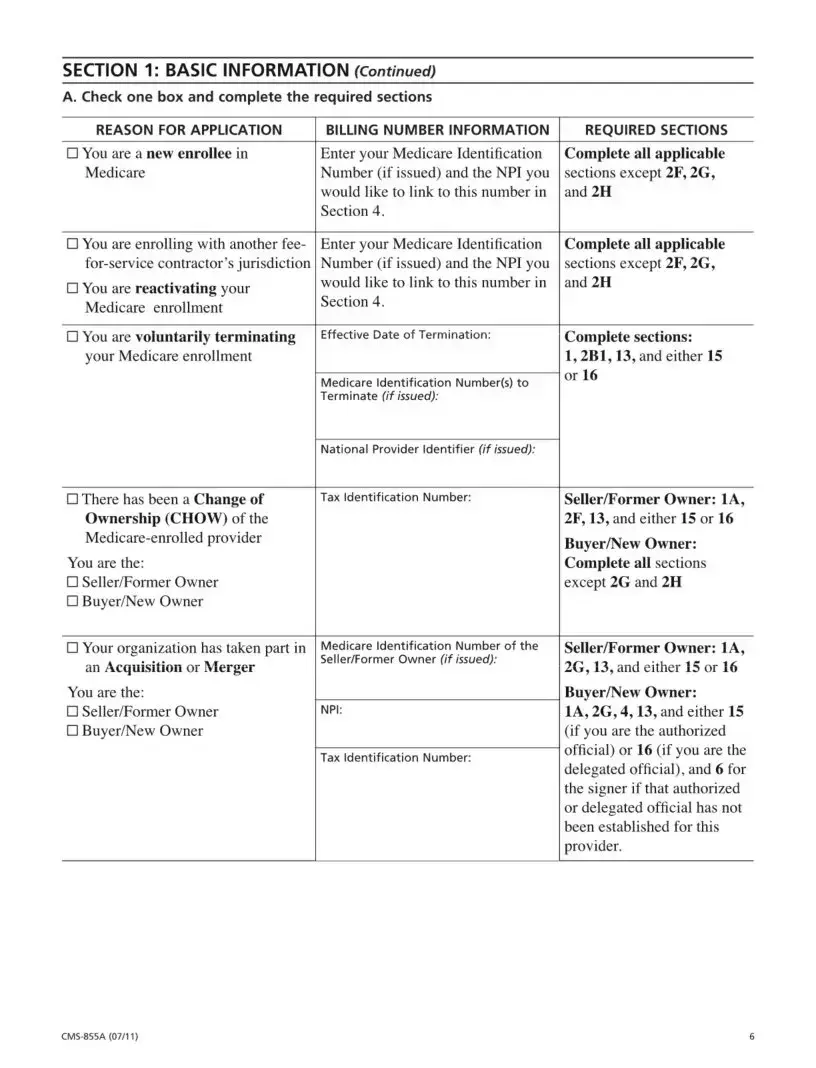
A. Check one box and complete the required sections
REASON FOR APPLICATION |
BILLING NUMBER INFORMATION |
□ You are a new enrollee in |
Enter your Medicare Identification |
Medicare |
Number (if issued) and the NPI you |
|
would like to link to this number in |
|
Section 4. |
REQUIRED SECTIONS
Complete all applicable
sections except 2F, 2G, and 2H
□You are enrolling with another fee-
□You are reactivating your
Medicare enrollment
□You are voluntarily terminating
your Medicare enrollment
□There has been a Change of
Ownership (CHOW) of the
You are the:
□Seller/Former Owner
□Buyer/New Owner
□Your organization has taken part in an Acquisition or Merger
Enter your Medicare Identification Number (if issued) and the NPI you would like to link to this number in Section 4.
Effective Date of Termination:
Medicare Identification Number(s) to
Terminate (if issued):
National Provider Identifier (if issued):
Tax Identification Number:
Medicare Identification Number of the Seller/Former Owner (if issued):
Complete all applicable
sections except 2F, 2G, and 2H
Complete sections:
1,2B1,13, and either 15 or 16
Seller/Former Owner: 1A,
2F, 13, and either 15 or 16
Buyer/New Owner: Complete all sections
except 2G and 2H
Seller/Former Owner: 1A,
2G, 13, and either 15 or 16
You are the: |
|
□ Seller/Former Owner |
NPI: |
□ Buyer/New Owner |
|
|
Tax Identification Number: |
Buyer/New Owner:
1A, 2G, 4,13, and either 15 (if you are the authorized official) or 16 (if you are the delegated official), and 6 for the signer if that authorized or delegated official has not been established for this provider.
6 |
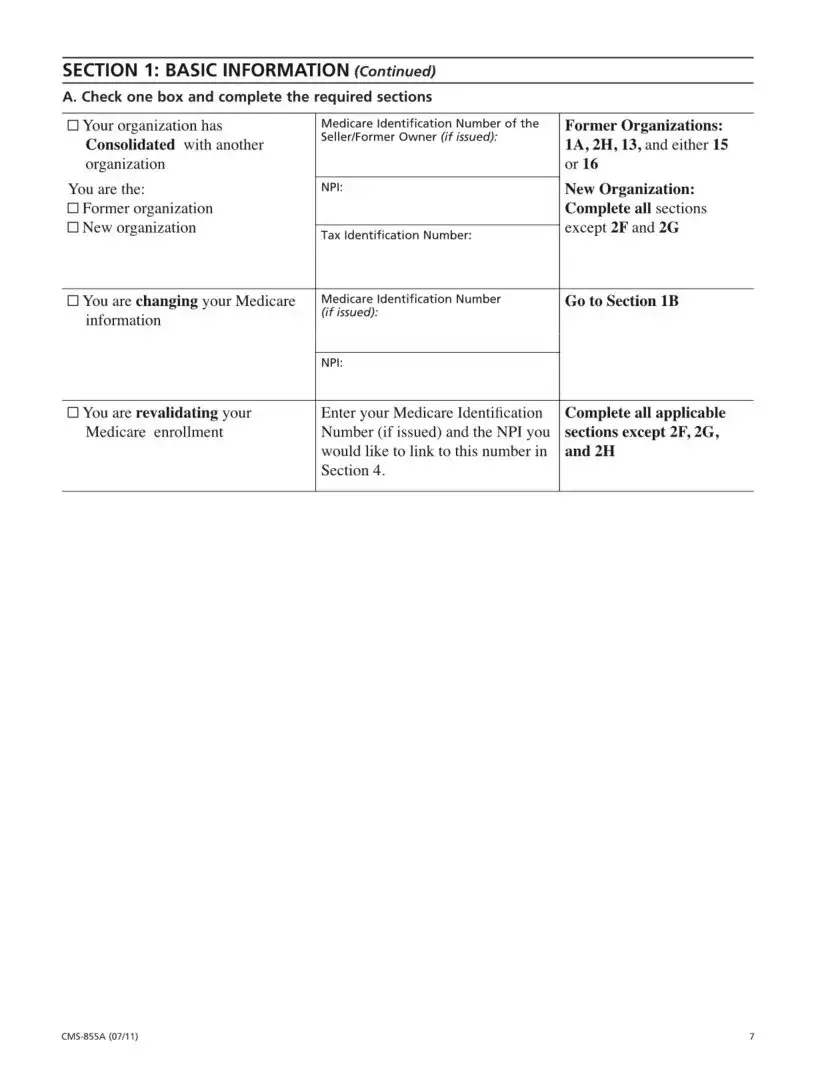
SECTION 1: BASIC INFORMATION (Continued)
A. Check one box and complete the required sections
□ Your organization has |
Medicare Identification Number of the |
Former Organizations: |
Consolidated with another |
Seller/Former Owner (if issued): |
1 A, 2H, 13, and either 15 |
|
||
organization |
|
or 16 |
You are the: |
NPI: |
New Organization: |
□ Former organization |
|
Complete all sections |
□ New organization |
Tax Identification Number: |
except 2F and 2G |
|
|
|
□ You are changing your Medicare |
Medicare Identification Number |
Go to Section IB |
information |
(if issued): |
|
|
|
|
|
NPI: |
|
□ You are revalidating your |
Enter your Medicare Identification |
Complete all applicable |
Medicare enrollment |
Number (if issued) and the NPI you |
sections except 2F, 2G, |
|
would like to link to this number in |
and 2H |
|
Section 4. |
|
7 |
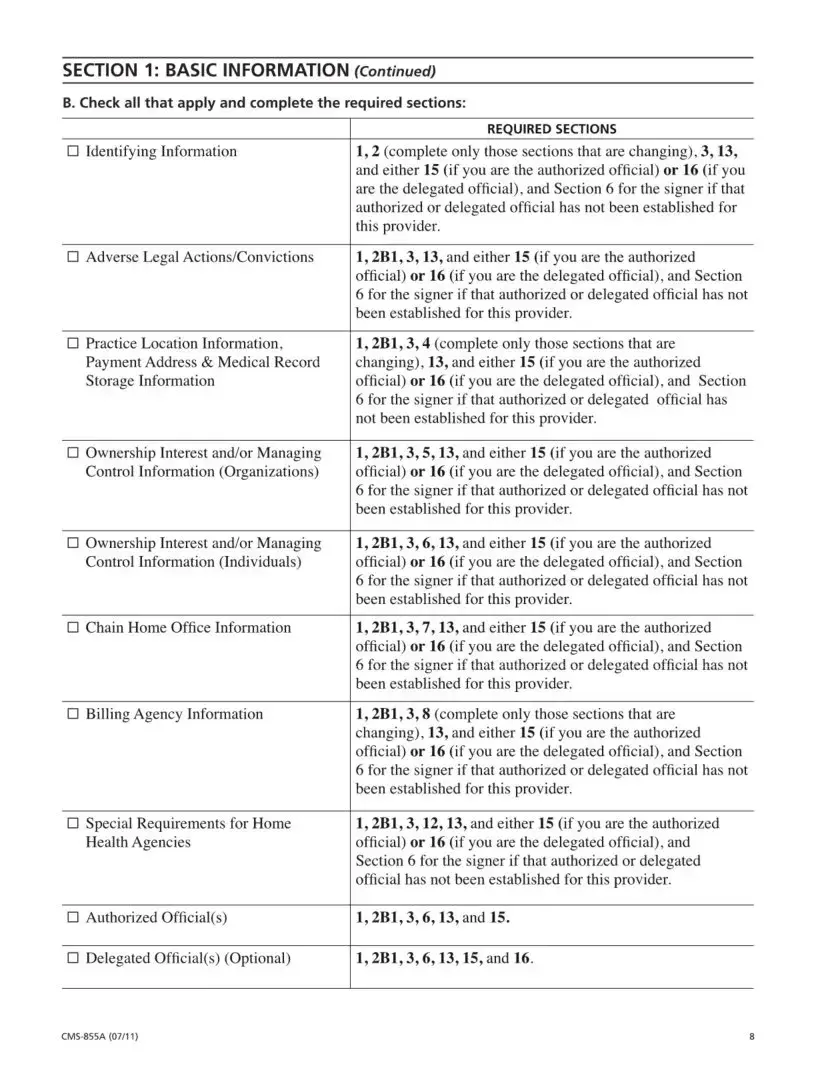
SECTION 1: BASIC INFORMATION (Continued)
B. Check all that apply and complete the required sections:
REQUIRED SECTIONS
□Identifying Information1,2 (complete only those sections that are changing), 3,13, and either 15 (if you are the authorized official) or 16 (if you are the delegated official), and Section 6 for the signer if that authorized or delegated official has not been established for this provider.
□Adverse Legal Actions/Convictions 1,2B1,3,13, and either 15 (if you are the authorized official) or 16 (if you are the delegated official), and Section 6 for the signer if that authorized or delegated official has not been established for this provider.
□Practice Location Information, 1,2B1,3,4 (complete only those sections that are
Payment Address & Medical Record |
changing), 13, and either 15 (if you are the authorized |
Storage Information |
official) or 16 (if you are the delegated official), and Section |
|
6 for the signer if that authorized or delegated official has |
|
not been established for this provider. |
□ Ownership Interest and/or Managing |
1,2B1,3,5,13, and either 15 (if you are the authorized |
Control Information (Organizations) |
official) or 16 (if you are the delegated official), and Section |
|
6 for the signer if that authorized or delegated official has not |
|
been established for this provider. |
□ Ownership Interest and/or Managing |
1,2B1,3,6,13, and either 15 (if you are the authorized |
Control Information (Individuals) |
official) or 16 (if you are the delegated official), and Section |
|
6 for the signer if that authorized or delegated official has not |
|
been established for this provider. |
□Chain Home Office Information 1,2B1,3,7,13, and either 15 (if you are the authorized official) or 16 (if you are the delegated official), and Section 6 for the signer if that authorized or delegated official has not been established for this provider.
□Billing Agency Information1,2B1,3,8 (complete only those sections that are changing), 13, and either 15 (if you are the authorized official) or 16 (if you are the delegated official), and Section 6 for the signer if that authorized or delegated official has not been established for this provider.
□Special Requirements for Home 1,2B1,3,12,13, and either 15 (if you are the authorized
Health Agencies |
official) or 16 (if you are the delegated official), and |
|
Section 6 for the signer if that authorized or delegated |
|
official has not been established for this provider. |
□ Authorized Official(s) |
1,2B1,3,6,13, and 15. |
□ Delegated Official(s) (Optional) |
1,2B1,3,6,13,15, and 16. |
8 |
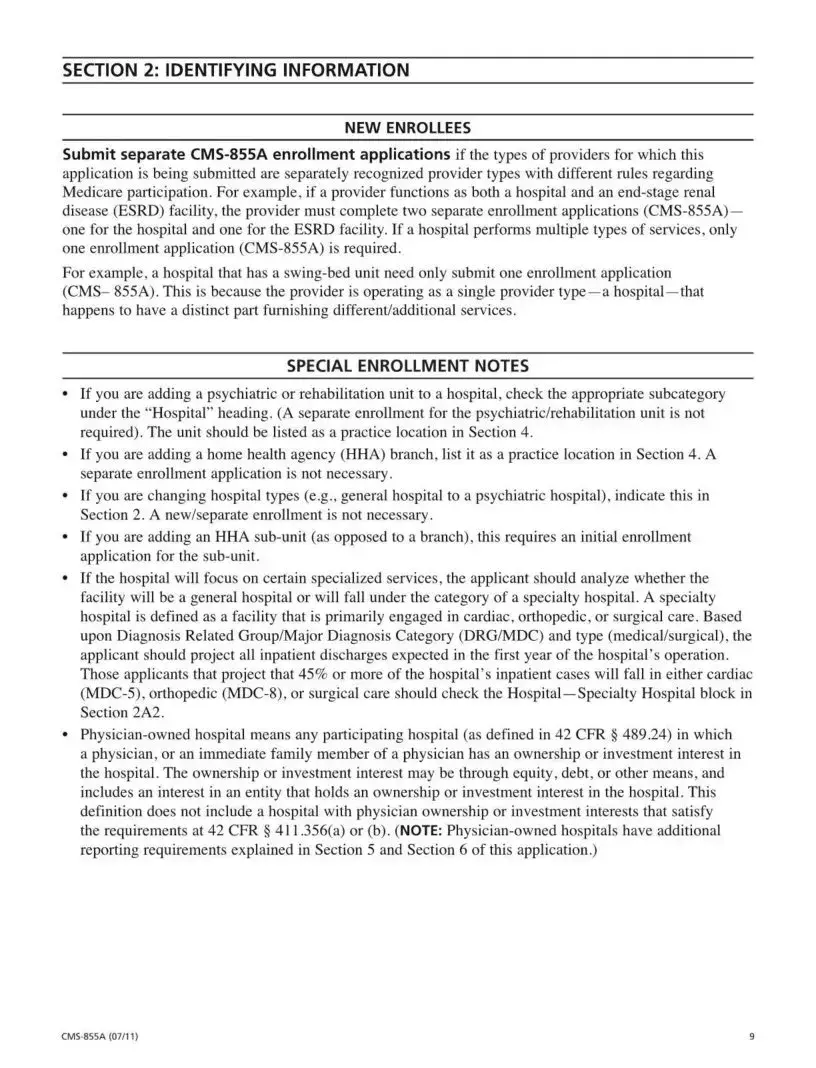
SECTION 2: IDENTIFYING INFORMATION
______________________________________ NEW ENROLLEES_____________________________________
Submit separate
application is being submitted are separately recognized provider types with different rules regarding Medicare participation. For example, if a provider functions as both a hospital and an
For example, a hospital that has a
SPECIAL ENROLLMENT NOTES
•If you are adding a psychiatric or rehabilitation unit to a hospital, check the appropriate subcategory under the “Hospital” heading. (A separate enrollment for the psychiatric/rehabilitation unit is not required). The unit should be listed as a practice location in Section 4.
•If you are adding a home health agency (HHA) branch, list it as a practice location in Section 4. A separate enrollment application is not necessary.
•If you are changing hospital types (e.g., general hospital to a psychiatric hospital), indicate this in Section 2. A new/separate enrollment is not necessary.
•If you are adding an HHA
•If the hospital will focus on certain specialized services, the applicant should analyze whether the facility will be a general hospital or will fall under the category of a specialty hospital. A specialty hospital is defined as a facility that is primarily engaged in cardiac, orthopedic, or surgical care. Based upon Diagnosis Related Group/Major Diagnosis Category (DRG/MDC) and type (medical/surgical), the applicant should project all inpatient discharges expected in the first year of the hospital's operation. Those applicants that project that 45% or more of the hospital's inpatient cases will fall in either cardiac
•
9 |
| Fact Name | Fact Description |
|---|---|
| Purpose | The CMS 855A form is used by institutional providers to enroll in the Medicare program or to update their enrollment information. |
| Who Should Use It | Health care organizations such as hospitals, community mental health centers, and skilled nursing facilities must complete this form to initiate or change their Medicare enrollment. |
| Submission Methods | Providers can submit the CMS 855A application either through the Internet-based PECOS system or by using the paper application process. |
| Required Documentation | Applicants must attach all required supporting documents when submitting the CMS 855A to ensure timely processing. |
| Legal Requirements | Changes in ownership or control must be reported within 30 days, as per 42 C.F.R. 424.516(e). Other changes should be reported within 90 days. |
| NPI Requirement | Providers must obtain a National Provider Identifier (NPI) before enrolling in Medicare. This is a separate process from completing the CMS 855A form. |
Completing the CMS 855A form is a crucial step in the Medicare enrollment process for institutional providers. Ensure that all required information is accurate and complete to avoid delays. Follow these steps carefully to fill out the form correctly.
Once your application is submitted, it will undergo a review process by the fee-for-service contractor. They will assess the information provided and may request additional documentation if necessary. Stay prepared to respond promptly to any requests to ensure a smooth enrollment process.
What is the CMS 855A form?
The CMS 855A form is the Medicare Enrollment Application for Institutional Providers. It is used by healthcare organizations to enroll in the Medicare program or to update their enrollment information. This form can be completed online through the Provider Enrollment, Chain and Ownership System (PECOS) or submitted as a paper application.
Who should complete the CMS 855A form?
Institutional providers such as hospitals, community mental health centers, and skilled nursing facilities must complete the CMS 855A form. Organizations that plan to bill Medicare for Part A medical services or need to report changes to their existing enrollment data should also use this form.
What information is required to complete the CMS 855A form?
Applicants must provide various details including the legal business name, correspondence address, and National Provider Identifier (NPI). Additionally, supporting documentation must be attached to the application. This documentation can include tax identification numbers and proof of ownership or control.
How do I obtain a National Provider Identifier (NPI)?
To obtain an NPI, healthcare providers must apply through the National Plan and Provider Enumeration System (NPPES). This process is separate from Medicare enrollment. Providers should ensure they have their NPI before completing the CMS 855A form.
What happens after I submit the CMS 855A form?
Once submitted, the fee-for-service contractor will review the application and recommend approval or denial to the State survey agency. A survey will be conducted to verify compliance. The final decision regarding enrollment eligibility will be made by the CMS Regional Office.
How can I avoid delays in the enrollment process?
To prevent delays, ensure that all required sections of the form are completed accurately. Verify that the legal business name matches tax documents, and that the correct person signs the application. Sending all necessary documentation to the designated fee-for-service contractor is crucial.
What if I need to report a change in ownership?
A change of ownership must be reported within 30 days of the effective date. If the new owner does not accept the transfer of the Medicare Identification Number, the previous owner’s agreement should be terminated, and the new owner must submit a new application.
Where do I mail my completed CMS 855A form?
The completed application should be mailed to the designated Medicare fee-for-service contractor for your state. You can find the appropriate mailing address by visiting the CMS website at www.cms.gov/MedicareProviderSupEnroll.
Incomplete Sections: One common mistake is leaving sections blank. All required sections must be filled out completely. Missing information can lead to delays in processing.
Incorrect Legal Business Name: Ensure the legal business name matches the name on tax documents. Discrepancies can cause confusion and result in application denial.
Wrong Correspondence Address: The correspondence address must be the provider’s actual address. If this is incorrect, important communications may not reach you.
Failure to Include NPI: Not entering your National Provider Identifier (NPI) in the appropriate sections is another frequent error. This number is crucial for your Medicare enrollment.
Missing Signatures: The application must be signed by the correct person. An unsigned application will be considered incomplete and will not be processed.
The CMS 855A form is a crucial document for institutional providers seeking enrollment in the Medicare program. However, it is often accompanied by other important forms and documents that help streamline the enrollment process. Below are four commonly used forms that may be required alongside the CMS 855A.
Submitting the CMS 855A form along with the appropriate supporting documents is vital for a smooth enrollment experience. Ensure all forms are completed accurately to avoid delays in the approval process.
The CMS 855B form is another important document in the Medicare enrollment process. It is specifically designed for individual health care providers who wish to enroll in Medicare. Similar to the CMS 855A, which targets institutional providers, the 855B form collects essential information about the provider, including their qualifications and practice locations. Both forms require detailed information to ensure that the providers meet the necessary standards to bill Medicare for services rendered. This parallel structure helps maintain consistency in the enrollment process across different types of providers.
The CMS 855I form serves as the enrollment application for individual practitioners. Like the CMS 855A, it requires comprehensive information about the provider's identity, practice locations, and services offered. The CMS 855I is tailored for those who provide services on a personal basis, such as physicians and other healthcare professionals, while the 855A is for organizations. Both forms necessitate that applicants disclose their National Provider Identifier (NPI) and adhere to similar submission guidelines, fostering a streamlined approach to Medicare enrollment.
The CMS 855R form is used for reassignment of Medicare benefits. This document is relevant for providers who want to allow another entity, such as a group practice or facility, to bill Medicare on their behalf. In this regard, it shares similarities with the CMS 855A in that both forms involve the transfer of billing privileges. However, while the 855A focuses on initial enrollment or changes in enrollment status, the 855R specifically addresses the reassignment of payment rights, thus serving a distinct purpose within the enrollment framework.
The CMS 855S form is aimed at suppliers of durable medical equipment, prosthetics, orthotics, and supplies (DMEPOS). This form is similar to the CMS 855A in that it requires detailed information about the business and its ownership structure. Both forms are integral to ensuring that providers meet Medicare's standards for participation. The CMS 855S, however, specifically targets suppliers of equipment rather than institutional providers, highlighting the diverse range of services covered under Medicare.
The CMS 855A form also shares characteristics with the CMS 855D form, which is for the enrollment of suppliers of DMEPOS. Like the CMS 855A, the 855D collects information about the supplier's business structure and operational details. Both forms are essential for ensuring that Medicare can accurately assess the qualifications of providers and suppliers seeking to participate in the program. This alignment in documentation helps streamline the approval process across various healthcare sectors.
Finally, the CMS 855O form is used for organizations that wish to enroll in the Medicare program as a provider of outpatient therapy services. This form is similar to the CMS 855A in that it requires detailed information about the organization and its services. Both forms emphasize the importance of compliance with Medicare regulations and the need for accurate reporting of ownership and operational information. By having these structured forms, Medicare can effectively manage the enrollment process for a wide range of healthcare providers and organizations.
When filling out the CMS 855A form, there are several key points to keep in mind. Here’s a list of what you should and shouldn’t do:
Misconceptions about the CMS 855A form can lead to confusion and delays in the enrollment process for institutional providers. Here are six common misconceptions explained:
Understanding these misconceptions can help streamline the enrollment process and ensure compliance with Medicare requirements.
Key Takeaways for Filling Out and Using the CMS 855A Form