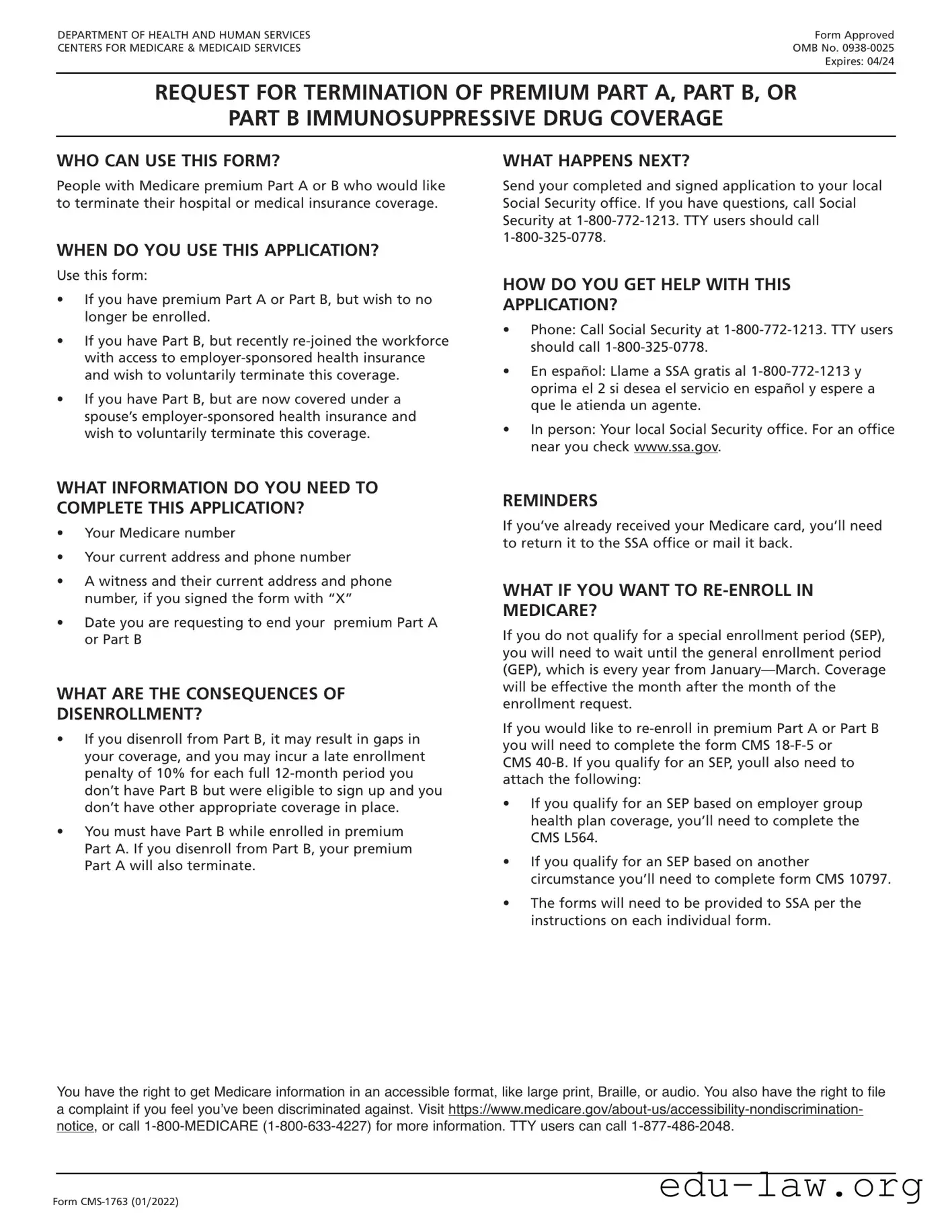
The CMS-1763 Exp form plays a crucial role in the realm of Medicare, particularly when it comes to the process of disenrollment from a Medicare Advantage plan or a Medicare Prescription Drug Plan. This form is primarily utilized by beneficiaries who wish to terminate their enrollment, ensuring that their request is formally documented and processed by the Centers for Medicare & Medicaid Services (CMS). It encompasses essential details such as the beneficiary's personal information, the specific plan from which they are disenrolling, and the effective date of disenrollment. By completing the CMS-1763 Exp form, individuals can take control of their healthcare choices, allowing them to explore alternative coverage options or revert to Original Medicare if that better suits their needs. Understanding the nuances of this form is vital for beneficiaries, as it not only facilitates a smooth transition but also helps avoid potential gaps in coverage. The process requires careful attention to detail and adherence to deadlines, making it imperative for individuals to be well-informed about their rights and responsibilities during this transition.

DEPARTMENT OF HEALTH AND HUMAN SERVICES |
Form Approved |
CENTERS FOR MEDICARE & MEDICAID SERVICES |
OMB No. |
|
Expires: 04/24 |
REQUEST FOR TERMINATION OF PREMIUM PART A, PART B, OR
PART B IMMUNOSUPPRESSIVE DRUG COVERAGE
WHO CAN USE THIS FORM?
People with Medicare premium Part A or B who would like to terminate their hospital or medical insurance coverage.
WHEN DO YOU USE THIS APPLICATION?
Use this form:
•If you have premium Part A or Part B, but wish to no longer be enrolled.
•If you have Part B, but recently
•If you have Part B, but are now covered under a spouse’s
WHAT HAPPENS NEXT?
Send your completed and signed application to your local Social Security office. If you have questions, call Social Security at
HOW DO YOU GET HELP WITH THIS
APPLICATION?
•Phone: Call Social Security at
•En español: Llame a SSA gratis al
•In person: Your local Social Security office. For an office near you check www.ssa.gov.
WHAT INFORMATION DO YOU NEED TO COMPLETE THIS APPLICATION?
•Your Medicare number
•Your current address and phone number
•A witness and their current address and phone number, if you signed the form with “X”
•Date you are requesting to end your premium Part A or Part B
WHAT ARE THE CONSEQUENCES OF
DISENROLLMENT?
•If you disenroll from Part B, it may result in gaps in your coverage, and you may incur a late enrollment penalty of 10% for each full
•You must have Part B while enrolled in premium Part A. If you disenroll from Part B, your premium Part A will also terminate.
REMINDERS
If you’ve already received your Medicare card, you’ll need to return it to the SSA office or mail it back.
WHAT IF YOU WANT TO
If you do not qualify for a special enrollment period (SEP), you will need to wait until the general enrollment period (GEP), which is every year from
If you would like to
CMS
•If you qualify for an SEP based on employer group health plan coverage, you’ll need to complete the CMS L564.
•If you qualify for an SEP based on another circumstance you’ll need to complete form CMS 10797.
•The forms will need to be provided to SSA per the instructions on each individual form.
You have the right to get Medicare information in an accessible format, like large print, Braille, or audio. You also have the right to file a complaint if you feel you’ve been discriminated against. Visit
Form

DEPARTMENT OF HEALTH AND HUMAN SERVICES CENTERS FOR MEDICARE & MEDICAID SERVICES
REQUEST FOR TERMINATION OF PREMIUM PART A, PART B,
OR PART B IMMUNOSUPPRESSIVE DRUG COVERAGE
The completion of this form is needed to document your voluntary request for termination of Medicare coverage as permitted under the Code of Federal Regulations. Section 1838(b) and 1818A(c)(2)(B) of the Social Security Act require filing of notice advising the Administration when termination of Medicare coverage is requested. While you are not required to give your reasons for requesting termination, the information given will be used to document your understanding of the effects of your request.
DO NOT WRITE IN THIS SPACE
NAME OF ENROLLEE (Please Print)
MEDICARE NUMBER
NAME OF PERSON, IF OTHER THAN ENROLLEE, WHO IS EXECUTING THIS REQUEST.
THIS IS A REQUEST FOR TERMINATION OF |
DATE PART A |
DATE PART B |
DATE PBID |
HOSPITAL INSURANCE |
WILL END |
WILL END |
WILL END |
MEDICAL INSURANCE |
|
|
|
PART B IMMUNOSUPPRESSIVE DRUG COVERAGE |
|
|
|
|
|
|
|
I request termination of my enrollment under the above sections of title XVIII of the Social Security Act, as amended, for the reason(s) stated below:
I UNDERSTAND THAT IF I AM REQUIRED TO PAY FOR MY HOSPITAL INSURANCE, THE TERMINATION OF MY PART B COVERAGE WILL ALSO END MY PART A COVERAGE.
If this request has been signed by mark (X), two witnesses who know the applicant must sign below, giving their full addresses.
1. NAME OF WITNESS
SIGNATURE (Write in Ink)
SIGN
HERE
ADDRESS (Number and Street, City, State and Zip Code)
MAILING ADDRESS (Number and Street)
2. NAME OF WITNESS
CITY, STATE, ZIP CODE
ADDRESS (Number and Street, City, State and Zip Code)
DATE (Month, Day and Year)
TELEPHONE NUMBER
According to the Paperwork Reduction Act of 1995, no persons are required to respond to a collection of information unless it displays a valid OMB control number. The valid OMB control number for this information collection is
Form
| Fact Name | Description |
|---|---|
| Purpose | The CMS-1763 Exp form is used to request the termination of Medicare coverage. |
| Eligibility | Individuals eligible for Medicare may use this form if they wish to end their coverage. |
| Submission | The completed form must be submitted to the Social Security Administration or the Medicare Administrative Contractor. |
| Governing Law | This form is governed by federal laws related to Medicare, specifically under Title XVIII of the Social Security Act. |
After obtaining the CMS-1763 Exp form, you will need to fill it out accurately. This form is essential for ensuring that your request is processed correctly. Follow the steps below to complete the form.
What is the CMS-1763 Exp form?
The CMS-1763 Exp form is a document used by the Centers for Medicare & Medicaid Services (CMS) to facilitate the process of requesting an extension of the Medicare Part B enrollment period. This form is essential for individuals who have missed their initial enrollment period and wish to avoid late enrollment penalties. By completing this form, beneficiaries can provide the necessary information to CMS, allowing them to assess eligibility for an extension based on specific circumstances.
Who needs to fill out the CMS-1763 Exp form?
Individuals who are eligible for Medicare but did not enroll during their initial enrollment period may need to complete the CMS-1763 Exp form. This includes people who may have experienced exceptional circumstances, such as health issues or lack of awareness regarding their eligibility. It is also relevant for those who are seeking to avoid penalties associated with late enrollment in Medicare Part B.
How do I submit the CMS-1763 Exp form?
The CMS-1763 Exp form can be submitted through several methods. Beneficiaries can mail the completed form to their local Social Security office or directly to the Medicare program. It is important to ensure that the form is filled out completely and accurately to avoid delays. Additionally, individuals may also submit the form online through the Social Security Administration’s website, if they have an account set up.
What information is required on the CMS-1763 Exp form?
The form requires various pieces of information, including the beneficiary's name, Medicare number, and the reasons for requesting an extension. It may also ask for details regarding the circumstances that led to the late enrollment, such as medical conditions or other significant life events. Providing thorough and truthful information is crucial, as it will help CMS make an informed decision regarding the extension request.
What happens after I submit the CMS-1763 Exp form?
After submission, CMS will review the information provided on the form. The review process may take several weeks, during which the applicant may be contacted for additional information if necessary. Once a decision is made, CMS will notify the applicant of the outcome. If the request is approved, the individual will be granted an extension to enroll in Medicare Part B without incurring penalties.
Can I appeal if my CMS-1763 Exp form request is denied?
Yes, if a request for an extension is denied, individuals have the right to appeal the decision. The denial notice will include information on how to file an appeal, including deadlines and the necessary forms to complete. It is advisable to gather any additional evidence or documentation that supports the case for an extension when preparing for the appeal process.
Missing Personal Information: Many individuals forget to include their full name, address, or Social Security number. This information is crucial for processing the form correctly.
Incorrect Dates: Filling in the wrong dates can lead to confusion. Ensure that all dates, including the date of request and any relevant medical service dates, are accurate.
Not Signing the Form: A common oversight is neglecting to sign the form. Without a signature, the form cannot be processed.
Providing Incomplete Medical Information: Be thorough when detailing medical services or conditions. Incomplete information may delay the processing of your request.
Failure to Review Before Submission: Rushing through the form can lead to mistakes. Take the time to review all entries before submitting to ensure accuracy.
The CMS-1763 Exp form is an important document used in the context of Medicare. However, it is often accompanied by other forms and documents that help streamline the process. Below is a list of six commonly used documents that may be relevant in conjunction with the CMS-1763 Exp form.
Understanding these documents can significantly ease the process of navigating Medicare-related applications and requests. Each form serves a specific purpose and helps ensure that individuals receive the benefits they are entitled to under the Medicare program.
The CMS-1763 Exp form is similar to the CMS-10126 form, which is used for disenrollment from Medicare Advantage plans. Both forms allow individuals to formally request to end their enrollment in a Medicare plan. The CMS-10126 requires specific information about the individual’s plan and reasons for disenrollment, much like the CMS-1763 Exp form, which collects necessary details to process the request effectively. Each form serves to ensure that the individual’s wishes are respected and documented in the Medicare system.
Another document that shares similarities with the CMS-1763 Exp form is the CMS-40B form. This form is used for applying for Medicare Part B. Like the CMS-1763 Exp form, it requires personal information and details about the applicant's Medicare coverage. Both forms are essential for managing Medicare enrollment and changes, ensuring that the correct information is submitted to the Centers for Medicare & Medicaid Services (CMS) for processing.
The CMS-855I form also resembles the CMS-1763 Exp form. This form is used by healthcare providers to enroll in Medicare. While the CMS-1763 Exp form is for disenrollment, both documents require detailed personal and insurance information. They are part of the broader Medicare system, facilitating the management of enrollment and ensuring that both beneficiaries and providers can navigate their options effectively.
Lastly, the CMS-1763 Exp form is similar to the CMS-1763 form itself, which is used for requesting a disenrollment from a Medicare plan but does not specify the expiration of coverage. Both forms involve the process of disenrollment but may differ in specific requirements or details needed for submission. They help streamline the disenrollment process, ensuring that individuals can manage their Medicare coverage as needed.
When filling out the CMS-1763 Exp form, there are several important guidelines to follow. Here are six things you should and shouldn't do:
The CMS-1763 Exp form is often misunderstood. Here are six common misconceptions about this form:
Understanding these misconceptions can help ensure a smoother process when dealing with the CMS-1763 Exp form.
When filling out the CMS-1763 Exp form, there are several important points to keep in mind. Here are some key takeaways:
By keeping these points in mind, you can navigate the process of using the CMS-1763 Exp form more smoothly.