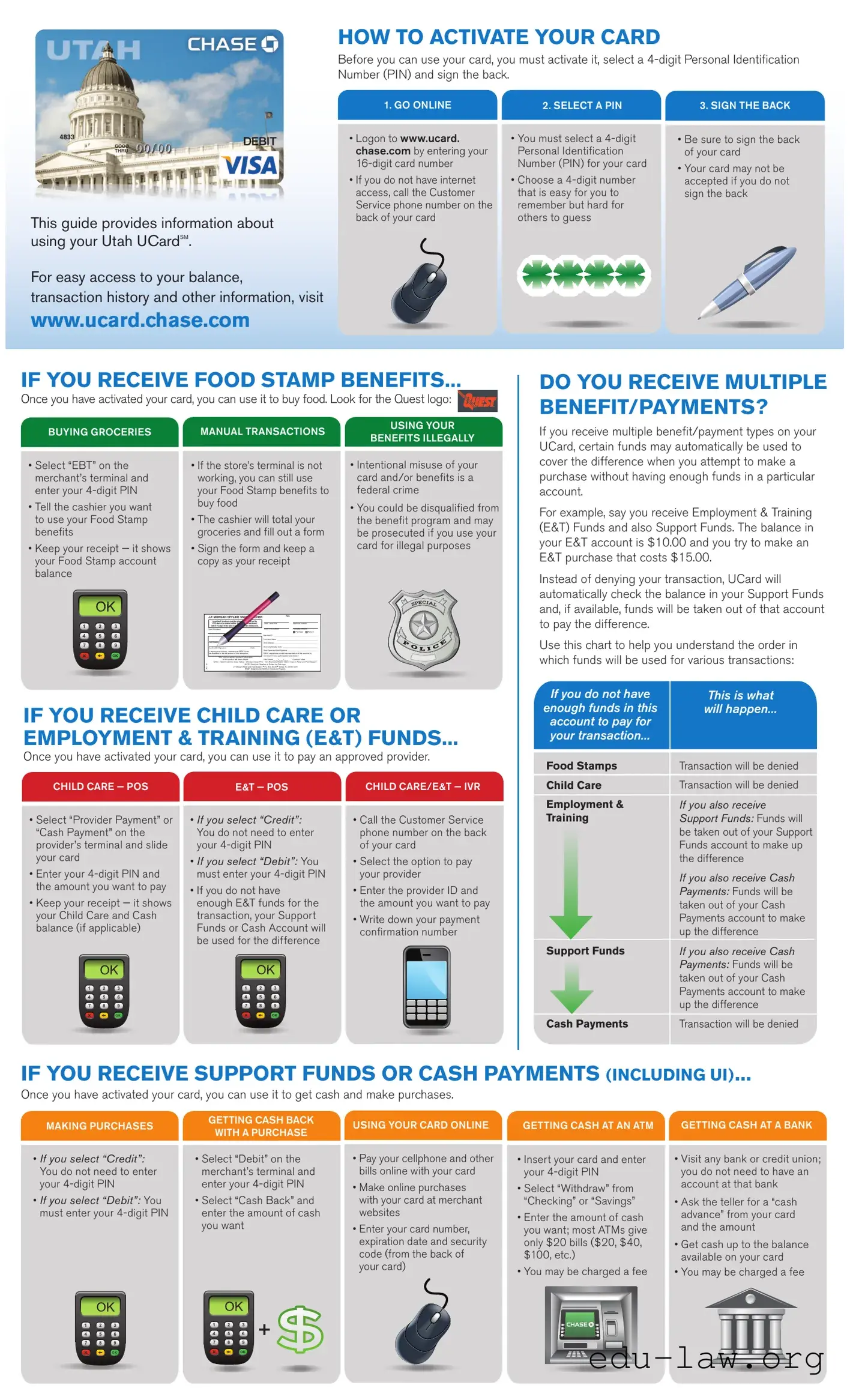
The Chase UCard form is an essential tool for managing various benefits and transactions associated with the UCard program. This form outlines the necessary steps for card activation, which includes selecting a secure Personal Identification Number (PIN) and signing the card. Users can easily access their account information online at www.ucard.chase.com, where they can check balances, view transaction history, and set up alerts for deposit notifications. The UCard can be used for purchasing groceries, paying approved childcare providers, and making cash withdrawals. For those receiving multiple types of benefits, the form provides guidance on how to use funds effectively, including the automatic transfer of funds from one account to cover shortfalls in another. Additionally, it emphasizes the importance of keeping the card and PIN secure to prevent unauthorized access. Overall, the Chase UCard form serves as a comprehensive guide for users to navigate their benefits and ensure they are used appropriately and securely.
HOW TO ACTIVATE YOUR CARD
Before you can use your card, you must activate it, select a
1. GO ONLINE |
2. SELECT A PIN |
3. SIGN THE BACK |
This guide provides information about using your Utah UCardSM.
For easy access to your balance,
transaction history and other information, visit
www.ucard.chase.com
•Logon to www.ucard. chase.com by entering your
•If you do not have internet access, call the Customer Service phone number on the back of your card
• You must select a |
• Be sure to sign the back |
Personal Identiication |
of your card |
Number (PIN) for your card |
• Your card may not be |
|
|
• Choose a |
accepted if you do not |
that is easy for you to |
sign the back |
remember but hard for |
|
others to guess |
|
IF YOU RECEIVE FOOD STAMP BENEFITS...
Once you have activated your card, you can use it to buy food. Look for the Quest logo:
DO YOU RECEIVE MULTIPLE BENEFIT/PAYMENTS?
BUYING GROCERIESMANUAL TRANSACTIONS
USING YOUR
If you receive multiple beneit/payment types on your
BENEFITS ILLEGALLY
• Select “EBT” on the |
• If the store’s terminal is not |
• Intentional misuse of your |
||||||||||
merchant’s terminal and |
working, you can still use |
card and/or beneits is a |
||||||||||
enter your |
your Food Stamp beneits to |
federal crime |
||||||||||
• Tell the cashier you want |
buy food |
|
|
|
|
|
• You could be disqualiied from |
|||||
• The cashier will total your |
||||||||||||
to use your Food Stamp |
the beneit program and may |
|||||||||||
beneits |
groceries and ill out a form |
be prosecuted if you use your |
||||||||||
• Keep your receipt — it shows |
• Sign the form and keep a |
card for illegal purposes |
||||||||||
|
||||||||||||
your Food Stamp account |
copy as your receipt |
|
|
|
|
|||||||
balance |
|
|
|
|
|
|
|
|
|
|
|
|
|
|
|
|
|
|
|
|
|
|
|
||
|
|
|
J.P. MORGAN OFFLINE SNAP VOUCHER |
No. |
|
|
|
|
||||
|
|
|
Important! Vouchers must be entered or cleared on the |
|
|
|
|
|
|
|
||
|
|
|
POS device (or mailed within 10 days if |
|
Trans. Date/Time |
|
Approval Number |
|
|
|
||
|
|
|
within 15 days of the sale or funds will not be reimbursed. |
|
|
|
|
|
|
|
||
|
|
Card Number: |
|
|
Store FNS Number |
Purchase Amount |
|
|
||||
|
|
|
|
|
|
|
|
Purchase Refund |
|
|
||
|
|
|
|
|
|
Merchant ID _________________________________________________ |
|
|
||||
|
|
|
|
|
|
Print Store Name _____________________________________________ |
|
|
||||
|
|
|
Print Cardholder Name |
|
|
Store Address ________________________________________________ |
|
|
||||
|
|
|
|
|
|
Store City/State/Zip Code _______________________________________ |
|
|
||||
|
|
|
Cardholder Signature |
Date |
|
|
|
|||||
|
|
|
In signing this voucher, I believe that SNAP funds |
|
Store Supervisor/Clerk Signature __________________________________ |
|
|
|||||
|
|
|
are available for the full amount of this transaction. |
|
SNAP regulations prohibit representation of this voucher by |
|
|
|||||
|
|
|
This voucher will be rejected if information |
merchant if voice authorization was denied. |
|
|
||||||
|
|
|
in this section has been altered. |
Date Entered |
Operator’s Initials _____________ |
|
|
|||||
|
|
|
White – Client/Customer Copy; Yellow – Merchant Copy; Pink – |
|
|
|||||||
|
|
INC11667 |
SNAP - Supplemental Nutrition Assistance Program |
|
|
|
|
|||||
|
|
|
|
NOTE: Electronic Retailers to Retain the Pink copy |
|
|
|
|
||||
|
|
|
|
J.P. Morgan Retail and Field Support • P.O. Box 30078 • Tampa, FL |
|
|
||||||
IF YOU RECEIVE CHILD CARE OR
EMPLOYMENT & TRAINING (E&T) FUNDS...
Once you have activated your card, you can use it to pay an approved provider.
CHILD CARE — POS |
E&T — POS |
CHILD CARE/E&T — IVR |
|
• Select “Provider Payment” or |
• If you select “Credit”: |
• Call the Customer Service |
|
“Cash Payment” on the |
You do not need to enter |
phone number on the back |
|
provider’s terminal and slide |
your |
of your card |
|
your card |
• If you select “Debit”: You |
• Select the option to pay |
|
|
|||
• Enter your |
must enter your |
your provider |
|
the amount you want to pay |
• If you do not have |
• Enter the provider ID and |
|
|
|||
• Keep your receipt — it shows |
enough E&T funds for the |
the amount you want to pay |
|
your Child Care and Cash |
transaction, your Support |
• Write down your payment |
|
balance (if applicable) |
Funds or Cash Account will |
||
conirmation number |
|||
|
be used for the difference |
||
|
|
UCard, certain funds may automatically be used to cover the difference when you attempt to make a purchase without having enough funds in a particular account.
For example, say you receive Employment & Training (E&T) Funds and also Support Funds. The balance in your E&T account is $10.00 and you try to make an E&T purchase that costs $15.00.
Instead of denying your transaction, UCard will automatically check the balance in your Support Funds and, if available, funds will be taken out of that account to pay the difference.
Use this chart to help you understand the order in which funds will be used for various transactions:
If you do not have |
This is what |
||
enough funds in this |
will happen... |
||
account to pay for |
|
||
your transaction... |
|
||
Food Stamps |
Transaction will be denied |
||
Child Care |
Transaction will be denied |
||
Employment & |
If you also receive |
||
Training |
Support Funds: Funds will |
||
|
|
|
be taken out of your Support |
|
|
|
|
|
|
|
Funds account to make up |
|
|
|
the difference |
|
|
|
If you also receive Cash |
|
|
|
Payments: Funds will be |
|
|
|
taken out of your Cash |
|
|
|
Payments account to make |
|
|
|
up the difference |
Support Funds |
If you also receive Cash |
||
|
|
|
Payments: Funds will be |
|
|
|
|
|
|
|
taken out of your Cash |
|
|
|
Payments account to make |
|
|
|
up the difference |
Cash Payments |
Transaction will be denied |
||
IF YOU RECEIVE SUPPORT FUNDS OR CASH PAYMENTS (INCLUDING UI)...
Once you have activated your card, you can use it to get cash and make purchases.
GETTING CASH BACK
MAKING PURCHASESUSING YOUR CARD ONLINE GETTING CASH AT AN ATM GETTING CASH AT A BANK WITH A PURCHASE
•If you select “Credit”: You do not need to enter your
•If you select “Debit”: You must enter your
•Select “Debit” on the merchant’s terminal and enter your
•Select “Cash Back” and enter the amount of cash you want
•Pay your cellphone and other bills online with your card
•Make online purchases with your card at merchant websites
•Enter your card number, expiration date and security code (from the back of your card)
•Insert your card and enter your
•Select “Withdraw” from “Checking” or “Savings”
•Enter the amount of cash you want; most ATMs give only $20 bills ($20, $40, $100, etc.)
•You may be charged a fee
•Visit any bank or credit union; you do not need to have an account at that bank
•Ask the teller for a “cash advance” from your card and the amount
•Get cash up to the balance available on your card
•You may be charged a fee
+
HOW TO CHECK YOUR BALANCE
Before using your card, it’s important to know how much money is on your card. You must have enough money to pay for your transaction plus any fees.
FREQUENTLY ASKED QUESTIONS
What are Deposit Notiication Alerts?
ONLINE
•Check your balance(s) and get your monthly account statements for FREE at www.ucard.chase.com
•If you have a cash account, you can choose to receive a paper statement (fee may apply); see the
ACCOUNT ALERTS |
BY PHONE |
• Automatic alerts will let you |
• Call the Customer Service |
know when a deposit has |
phone number on the |
been made and your new |
back of your card |
available balance |
• You will hear your |
|
|
• Visit www.ucard.chase.com |
balance(s) after you have |
or call Customer Service to |
entered your security |
information |
|
Account Alerts via text, email |
|
or voice message |
|
With Deposit Notiication Alerts, you can get an automatic text, email or phone message whenever funds are added to your UCard account. In addition to providing the speciic deposit amount and date, this alert will also include your available account balance. To sign up for Deposit Notiication Alerts, logon to www.ucard.chase. com or call Customer Service.
What if there is an incorrect food stamp transaction on my account?
When a retailer is paid either too much or too little from your UCard food stamp account due to a computer system problem, a correction may be made to your balance. This correction could impact your current or next month’s balance. You will be mailed an adjustment notice of the correction if it reduces your balance. If you notice an incorrect transaction on your account, call Customer Service.
HOW TO MANAGE YOUR DEPOSITS
It’s important to know when you receive your deposits and how much you have on your card.
What happens if I don’t use all my funds?
Your balance at the end of the month is carried over to the next month. You should access your account on a regular basis. Do not go for long periods of time without
DEPOSITS
•Deposit dates vary depending on the type of payment(s) you receive
•See the Deposit Issuance Schedule that came with your card
•Unused funds are carried over to the next month
KNOW YOUR BALANCE
•Logon to www.ucard. chase.com, or
•Sign up for Deposit Notiication Alerts (see Frequently Asked Questions), or
•For Food Stamps, check your last receipt, or
•Call Customer Service
AVOID FEES
•There may be fees for using your card in certain situations
•See the Card Fees that came with your card
•There is never a fee for using Food Stamp or Child Care beneits
•There is also never a fee for making purchases at a store or a provider
using your account.
•Food Stamp and/or Cash payments that have not been accessed for 365 days will be removed from your account.
•Child Care beneits that have not been accessed for 90 days will be removed from your account.
•Employment and Training funds that have not been accessed for 120 days will be removed from your account.
FEES
HOW TO KEEP YOUR CARD AND PIN SAFE
Your card and PIN are the keys to getting your deposits. If someone gets your card and knows your PIN, they could use all your funds — and those funds will not be replaced.
CARD CARE |
PIN SAFETY |
CARD/PIN REPLACEMENT |
|
• Keep your card in a safe |
• Do not write your PIN on your |
• If your card is lost, stolen |
|
place, like your wallet or purse |
card or on anything you keep |
or damaged logon to www. |
|
• Do not get your card dirty |
with your card |
ucard.chase.com (or call |
|
|
Customer Service) to order |
||
• Keep your card away from |
• NEVER tell your PIN to anyone |
||
a new one |
|||
|
|||
magnets and electronics |
• Do not try to guess your PIN; |
||
• If you forget your PIN or |
|||
• Do not leave your card in |
if you enter it wrong four times, |
||
want to change it, logon to |
|||
direct sunlight |
your card will be locked until |
||
www.ucard.chase.com |
|||
|
midnight Mountain Time |
||
|
(or call Chase Customer |
||
|
|
||
|
|
Service) to select a new one |
HOW TO PAY BILLS WITH YOUR CARD
If you get cash payments, you can pay your cellphone, utilities and other bills with your card.
BY PHONE |
ONLINE — COMPANY WEBSITE |
ONLINE — UCARD |
|||||
• Call the company you are |
• Visit the website of the |
• Online bill pay is only available |
|||||
paying and ask to pay your |
company you are paying |
for Support Funds and Cash |
|||||
bill with your card |
and pay your bill with |
accounts |
|||||
• You will be asked to provide |
your card |
• Visit www.ucard.chase.com to |
|||||
|
|||||||
your card number, expiration |
• Enter your card number, |
enroll in Online Bill Pay and set- |
|||||
date and the |
expiration date and the |
up your list of companies to pay |
|||||
code (from the back of |
• Schedule payments with just |
||||||
your card) |
the back of your card) |
||||||
a few clicks |
|||||||
|
|
||||||
|
|
• You will be charged a small fee |
|||||
|
|
for each bill payment |
|||||
|
|
|
|
|
|
|
|
|
|
|
|
|
|
|
|
|
|
|
|
|
|
|
|
What is the difference between a transaction fee and an ATM surcharge?
An ATM surcharge is a fee charged by the ATM owner and the amount varies by owner. There is no surcharge at any Chase ATM in the U.S. Chase may charge a transaction fee for ATM withdrawals. Please see the Fees for Using Your Card on the letter your card was attached to in this package.
What if I enter the wrong PIN or forget my PIN?
Do not try to guess your PIN. For your security, your card will be locked after four incorrect PIN entries and you will not be able to use it until after midnight Mountain Time.
If you forget your PIN, call Chase Customer Service to select a new one.
What should I do if I lose or damage my card?
If your card is lost, stolen or damaged, go online or call Chase Customer Service right away to protect your money and request a new card.
SAFETY TIPS
•At ATMs, be alert for lights not working, anyone loitering nearby or shadowed areas where someone might hide; consider coming back later if you notice anything or anybody suspicious.
•Avoid scams — Chase will never contact you via
www.ucard.chase.com
USDA is an equal opportunity provider and employer.
© 2012 JPMorgan Chase & Co. All rights reserved. JPMorgan Chase Bank, N.A. Member FDIC.
| Fact Name | Details |
|---|---|
| Activation Steps | To activate your Chase UCard, go online, select a 4-digit PIN, and sign the back of the card. |
| Food Stamp Usage | Once activated, the card can be used to purchase food. Look for the Quest logo at participating stores. |
| Multiple Benefits | If you receive multiple benefits, select "EBT" on the merchant's terminal to use your Food Stamp benefits. |
| Child Care Payments | For child care or Employment & Training funds, select "Provider Payment" or "Cash Payment" at the provider's terminal. |
| Balance Checking | You can check your balance online at www.ucard.chase.com or by calling Customer Service. |
| Governing Law | This form is governed by the laws of the State of Utah. |
Filling out the Chase Ucard form is a straightforward process. It’s essential to follow the steps carefully to ensure your card is activated and ready for use. Once you complete the form, you will be able to manage your funds effectively and make purchases or payments as needed.
What steps do I need to take to activate my Chase UCard?
To activate your Chase UCard, follow these simple steps: First, go online to www.ucard.chase.com. Enter your 16-digit card number to log in. Next, select a 4-digit Personal Identification Number (PIN) that you will remember but is difficult for others to guess. Finally, sign the back of your card. This process ensures your card is ready for use.
How can I check my balance on the Chase UCard?
You can check your balance in several ways. The easiest method is to log on to www.ucard.chase.com. If you prefer to use your phone, call the Customer Service number located on the back of your card. You can also sign up for Deposit Notification Alerts, which will inform you of your balance whenever funds are added to your account.
What should I do if I notice an incorrect food stamp transaction on my account?
If you see an incorrect transaction, it’s important to act quickly. Call Customer Service to report the issue. If a retailer was overpaid or underpaid due to a system error, a correction may occur that affects your balance. If this happens, you will receive a notice in the mail if the correction reduces your balance.
What happens to my unused funds at the end of the month?
Your unused funds will carry over to the next month. It’s a good idea to regularly check your balance and access your account to avoid losing any benefits. Remember, funds for Food Stamps, Child Care, and Employment & Training that have not been accessed for specific periods may be removed from your account, so stay informed and manage your funds wisely.
Incorrect Personal Identification Number (PIN): Many people choose a PIN that is easy to remember, but they might make it too simple. It’s important to select a PIN that is unique and not easily guessed.
Failure to Sign the Card: Some individuals forget to sign the back of their card. This step is crucial for the card to be accepted at stores.
Not Activating the Card: A common mistake is to overlook the activation process. Without activating the card, it cannot be used.
Missing Information: Applicants sometimes leave out required information on the form. Double-checking all fields before submission can prevent delays.
Using Outdated Information: People may use old addresses or phone numbers. Keeping personal information current is essential for account management.
Ignoring Terms and Conditions: Some individuals skip reading the terms and conditions. Understanding these can prevent misuse and ensure compliance with rules.
Not Keeping Receipts: Failing to keep receipts from transactions can lead to confusion about balances and transactions. It’s wise to retain these for reference.
Neglecting to Check Balance Regularly: Many users do not check their balance frequently. Keeping track of funds can help avoid overdrafts and ensure sufficient funds for purchases.
When using the Chase UCard, several other forms and documents may be necessary to facilitate transactions, manage benefits, or ensure compliance with regulations. Understanding these documents can help users navigate their financial activities more effectively.
Familiarizing oneself with these forms and documents can enhance the experience of using the Chase UCard, ensuring smooth transactions and effective management of benefits. Keeping these resources handy will help users navigate their financial needs with confidence.
The Chase UCard form shares similarities with a debit card activation form. Both documents require users to activate their cards before use. They typically instruct users to select a Personal Identification Number (PIN) and sign the back of the card. This ensures that only the cardholder can access the funds and make transactions. Furthermore, both forms often include guidelines on how to check balances and manage transactions, emphasizing security and proper usage.
Another document that resembles the Chase UCard form is a food assistance benefits card guide. Like the UCard, this guide provides detailed instructions on how to use the card for purchasing groceries. It highlights the importance of selecting a PIN and offers tips on ensuring that the card is used legally. Both documents also warn users about the consequences of misuse, reinforcing the need for responsible management of benefits.
A third similar document is a prepaid card user manual. This type of manual typically outlines how to activate the card, select a PIN, and make purchases. Similar to the Chase UCard, it may include instructions for checking balances and a list of fees associated with card usage. Both documents focus on user accessibility and the importance of keeping personal information secure.
The SNAP (Supplemental Nutrition Assistance Program) voucher also bears resemblance to the Chase UCard form. Both documents facilitate the purchasing of food with specific instructions on how to use the card or voucher at the point of sale. They provide information on what to do if a transaction fails and emphasize the importance of keeping receipts for tracking benefits. Additionally, both documents outline the steps to take in case of incorrect transactions.
A cash assistance card guide is another document similar to the Chase UCard form. Both guides instruct users on how to access cash and make purchases using their respective cards. They often provide information on ATM usage, including how to withdraw cash and any associated fees. Both documents prioritize user security and detail what to do if the card is lost or stolen.
Additionally, a bill payment guide for prepaid cards shares features with the Chase UCard form. Both documents explain how to use the card for paying bills, whether online or over the phone. They typically include steps for entering card details and may outline any fees related to bill payments. This similarity emphasizes the versatility of the card in managing finances.
A user agreement for a reloadable prepaid card is another document that aligns with the Chase UCard form. Both documents detail the terms and conditions of using the card, including fees and limitations. They may provide guidance on how to reload funds onto the card and how to keep track of transactions. This ensures that users understand their rights and responsibilities while using the card.
The cardholder agreement for a credit card also shows similarities to the Chase UCard form. Both documents require users to agree to certain terms before using the card. They typically include information on fees, interest rates, and consequences of late payments. This agreement helps users understand their obligations and the importance of managing their finances responsibly.
Lastly, a mobile banking app guide can be compared to the Chase UCard form. Both documents provide instructions on accessing account information and managing funds. They often include steps for setting up alerts for transactions and deposits. This focus on technology and convenience highlights how users can easily track their finances and stay informed about their balances.
Things to Do When Filling Out the Chase UCard Form:
Things Not to Do When Filling Out the Chase UCard Form:
This is not true. Before using your card, you must activate it, select a 4-digit PIN, and sign the back. Activation is a crucial step to ensure your card functions properly.
While you can select a 4-digit number, it is important to choose one that is easy for you to remember but hard for others to guess. This helps protect your account from unauthorized access.
In fact, you can easily check your balance online at www.ucard.chase.com. This provides a convenient way to keep track of your funds.
This is incorrect. Intentional misuse of your card and benefits is a federal crime. Misusing your benefits can lead to disqualification from the program and potential legal consequences.
While there are no fees for using Food Stamp or Child Care benefits, certain situations may incur fees. It's important to review the Card Fees information that came with your card.
Unused funds do not expire monthly; however, if Food Stamp or Cash payments are not accessed for a specified period, they may be removed from your account. It's wise to check your balance regularly.
This is a risky practice. You should never write your PIN on your card or keep it in a place where it can be easily found. Protecting your PIN is essential for your account's security.
You can reset your PIN if you forget it. Simply call Chase Customer Service or log on to the website to select a new PIN.
On the contrary, you can use your card to get cash back at the point of sale, at ATMs, or at banks. Just be sure to select the correct option and follow the prompts to access your funds.
When filling out and using the Chase Ucard form, consider the following key takeaways: