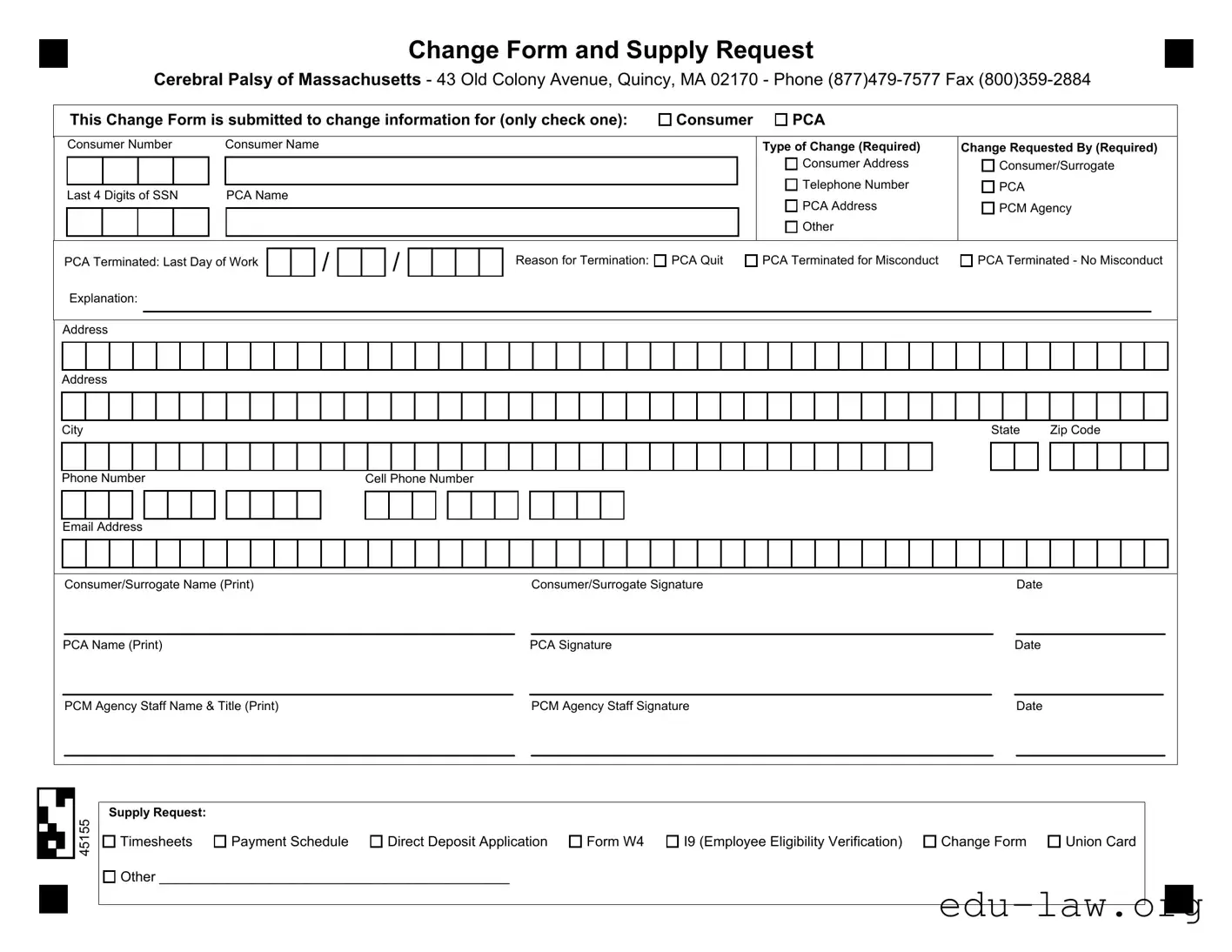
The Cerebral Palsy Massachusetts PCA form serves as an essential tool for managing various aspects of personal care assistance for individuals with cerebral palsy. This form is designed to facilitate changes in consumer or PCA information, ensuring that all relevant details are current and accurate. Users can indicate whether they are submitting changes related to the consumer or the PCA by checking the appropriate box. The form requires specific information such as the consumer's name, PCA's name, and the type of change being requested, which could include updates to addresses, telephone numbers, or even termination details. Additionally, it allows for the documentation of the reason for PCA termination, if applicable. The form must be completed with signatures from the consumer or their surrogate, the PCA, and the PCM agency staff, ensuring accountability and clarity in the process. Furthermore, a supply request section is included, allowing users to request necessary documents like timesheets or direct deposit applications. This comprehensive approach helps maintain the integrity of the care provided while streamlining administrative tasks.
Change Form and Supply Request
Cerebral Palsy of Massachusetts - 43 Old Colony Avenue, Quincy, MA 02170 - Phone
This Change Form is submitted to change information for (only check one): |
Consumer |
PCA |
Consumer Number
Last 4 Digits of SSN
Consumer Name
PCA Name
Type of Change (Required)
Consumer Address
Telephone Number
PCA Address
Other
Change Requested By (Required)
Consumer/Surrogate
PCA
PCM Agency
|
PCA Terminated: Last Day of Work |
|
|
|
|
/ |
|
|
|
|
/ |
|
|
|
|
|
|
|
|
|
|
|
|
|
|
Reason for Termination: PCA Quit |
PCA Terminated for Misconduct |
PCA Terminated - No Misconduct |
|
|||||||||||||||||||||||||||||||||||||||||||||
|
|
|
|
|
|
|
|
|
|
|
|
|
|
|
|
|
|
|
|
|
|
|
||||||||||||||||||||||||||||||||||||||||||||||||||||
|
|
|
|
|
|
|
|
|
|
|
|
|
|
|
|
|
|
|
|
|
|
|
|
|
|
|
||||||||||||||||||||||||||||||||||||||||||||||||
|
|
|
|
|
|
|
|
|
|
|
|
|
|
|
|
|
|
|
|
|
|
|
|
|
|
|
|
|
|
|
|
|
|
|
|
|
|
|
|
|
|
|
|
|
|
|
|
|
|
|
|
|
|
|
|
|
|
|
|
|
|
|
||||||||||||
|
Explanation: |
|
|
|
|
|
|
|
|
|
|
|
|
|
|
|
|
|
|
|
|
|
|
|
|
|
|
|
|
|
|
|
|
|
|
|
|
|
|
|
|
|
|
|
|
|
|
|
|
|
|
|
|
|
|
|
|
|
|
|
||||||||||||||
|
|
|
|
|
|
|
|
|
|
|
|
|
|
|
|
|
|
|
|
|
|
|
|
|
|
|
|
|
|
|
|
|
|
|
|
|
|
|
|
|
|
|
|
|
|
|
|
|
|
|
|
|
|
|
|
|
|
|
|
|
|
|
||||||||||||
|
|
|
|
|
|
|
|
|
|
|
|
|
|
|
|
|
|
|
|
|
|
|
|
|
|
|
|
|
|
|
|
|
|
|
|
|
|
|
|
|
|
|
|
|
|
|
|
|
|
|
|
|
|
|
|
|
|
|
|
|
|
|
|
|
|
|
|
|
|
|
|
|
|
|
|
Address |
|
|
|
|
|
|
|
|
|
|
|
|
|
|
|
|
|
|
|
|
|
|
|
|
|
|
|
|
|
|
|
|
|
|
|
|
|
|
|
|
|
|
|
|
|
|
|
|
|
|
|
|
|
|
|
|
|
|
|||||||||||||||
|
|
|
|
|
|
|
|
|
|
|
|
|
|
|
|
|
|
|
|
|
|
|
|
|
|
|
|
|
|
|
|
|
|
|
|
|
|
|
|
|
|
|
|
|
|
|
|
|
|
|
|
|
|
|
|
|
|
|
|
|
|
|
|
|
|
|
|
|
|
|
|
|
|
|
|
|
|
|
|
|
|
|
|
|
|
|
|
|
|
|
|
|
|
|
|
|
|
|
|
|
|
|
|
|
|
|
|
|
|
|
|
|
|
|
|
|
|
|
|
|
|
|
|
|
|
|
|
|
|
|
|
|
|
|
|
|
|
|
|
|
|
|
|
|
|
|
|
|
|
|
Address |
|
|
|
|
|
|
|
|
|
|
|
|
|
|
|
|
|
|
|
|
|
|
|
|
|
|
|
|
|
|
|
|
|
|
|
|
|
|
|
|
|
|
|
|
|
|
|
|
|
|
|
|
|
|
|
|
|
|
|||||||||||||||
|
|
|
|
|
|
|
|
|
|
|
|
|
|
|
|
|
|
|
|
|
|
|
|
|
|
|
|
|
|
|
|
|
|
|
|
|
|
|
|
|
|
|
|
|
|
|
|
|
|
|
|
|
|
|
|
|
|
|
|
|
|
|
|
|
|
|
|
|
|
|
|
|
|
|
|
|
|
|
|
|
|
|
|
|
|
|
|
|
|
|
|
|
|
|
|
|
|
|
|
|
|
|
|
|
|
|
|
|
|
|
|
|
|
|
|
|
|
|
|
|
|
|
|
|
|
|
|
|
|
|
|
|
|
|
|
|
|
|
|
|
|
|
|
|
|
|
|
|
|
|
City |
|
|
|
|
|
|
|
|
|
|
|
|
|
|
|
|
|
|
|
|
|
|
|
|
|
|
|
|
|
|
|
|
|
|
|
|
|
|
|
|
|
|
|
|
|
State |
Zip Code |
|
|||||||||||||||||||||||||
|
|
|
|
|
|
|
|
|
|
|
|
|
|
|
|
|
|
|
|
|
|
|
|
|
|
|
|
|
|
|
|
|
|
|
|
|
|
|
|
|
|
|
|
|
|
|
|
|
|
|
|
|
|
|
|
|
|
|
|
|
|
|
|
|
|
|||||||||
|
|
|
|
|
|
|
|
|
|
|
|
|
|
|
|
|
|
|
|
|
|
|
|
|
|
|
|
|
|
|
|
|
|
|
|
|
|
|
|
|
|
|
|
|
|
|
|
|
|
|
|
|
|
|
|
|
|
|
|
|
|
|
|
|
|
|
|
|
|
|
|
|
|
|
|
Phone Number |
|
|
|
|
|
|
Cell Phone Number |
|
|
|
|
|
|
|
|
|
|
|
|
|
|
|
|
|
|
|
|
|
|
|
|
|
|
|
|
|
|
|
|
|
|
|
|
|
|
|
|
||||||||||||||||||||||||||
|
|
|
|
|
|
|
|
|
|
|
|
|
|
|
|
|
|
|
|
|
|
|
|
|
|
|
|
|
|
|
|
|
|
|
|
|
|
|
|
|
|
|
|
|
|
|
|
|
|
|
|
|
|
|
|
|
|
|
|
|
|
|
|
|
|
|||||||||
|
|
|
|
|
|
|
|
|
|
|
|
|
|
|
|
|
|
|
|
|
|
|
|
|
|
|
|
|
|
|
|
|
|
|
|
|
|
|
|
|
|
|
|
|
|
|
|
|
|
|
|
|
|
|
|
|
|
|
|
|
|
|
|
|
|
|
|
|
|
|
|
|
|
|
|
Email Address |
|
|
|
|
|
|
|
|
|
|
|
|
|
|
|
|
|
|
|
|
|
|
|
|
|
|
|
|
|
|
|
|
|
|
|
|
|
|
|
|
|
|
|
|
|
|
|
|
|
|
|
|
|
|
|
|
|
|
|||||||||||||||
|
|
|
|
|
|
|
|
|
|
|
|
|
|
|
|
|
|
|
|
|
|
|
|
|
|
|
|
|
|
|
|
|
|
|
|
|
|
|
|
|
|
|
|
|
|
|
|
|
|
|
|
|
|
|
|
|
||||||||||||||||||
|
|
|
|
|
|
|
|
|
|
|
|
|
|
|
|
|
|
|
|
|
|
|
|
|
|
|
|
|
|
|
|
|
|
|
|
|
|
|
|
|
|
|
|
|
|
|
|
|
|
|
|
|
|
|
|
|
|
|
|
|
|
|
|
|
|
|
|
|
|
|
|
|
|
|
|
|
|
|
|
|
|
|
|
|
|
|
|
|
|
|
|
|
|
|
|
|
|
|
|
|
|
|
|
|
|
|
|
|
|
|
|
|
|
|
|
|
|
|
|
|
|
|
|
|
|
|
|
||||||||||||||||||||||
|
Consumer/Surrogate Name (Print) |
|
|
|
|
|
|
|
|
|
|
|
|
|
|
|
|
|
|
|
|
|
|
|
|
|
Consumer/Surrogate Signature |
|
|
|
|
|
|
|
|
|
|
|
|
|
Date |
|
|
|
|
|
|
|
|
|||||||||||||||||||||||||
|
|
|
|
|
|
|
|
|
|
|
|
|
|
|
|
|
|
|
|
|
|
|
|
|
|
|
|
|
|
|
|
|
|
|
|
|
|
|
|
|
|
|
|
|
|
|
|
|
|
|
|
|
||||||||||||||||||||||
|
PCA Name (Print) |
|
|
|
|
|
|
|
|
|
|
|
|
|
|
|
|
|
|
|
|
|
|
|
|
|
PCA Signature |
|
|
|
|
|
|
|
|
|
|
|
|
|
Date |
|
|
|
|
|
|
|
|
|||||||||||||||||||||||||
|
|
|
|
|
|
|
|
|
|
|
|
|
|
|
|
|
|
|
|
|
|
|
|
|
|
|
|
|
|
|
|
|
|
|
|
|
|
|
|
|
|
|
|
|
|
|
|
|
|
|
|
|
||||||||||||||||||||||
|
PCM Agency Staff Name & Title (Print) |
|
|
|
|
|
|
|
|
|
|
|
|
|
|
|
|
|
|
|
|
|
|
|
|
|
PCM Agency Staff Signature |
|
|
|
|
|
|
|
|
|
|
|
|
|
Date |
|
|
|
|
|
|
|
|
|||||||||||||||||||||||||
|
|
|
|
|
|
|
|
|
|
|
|
|
|
|
|
|
|
|
|
|
|
|
|
|
|
|
|
|
|
|
|
|
|
|
|
|
|
|
|
|
|
|
|
|
|
|
|
|
|
|
|
|
|
|
|
|
|
|
|
|
|
|
|
|
|
|
|
|
|
|
|
|
|
|
|
|
|
|
|
|
|
|
|
|
|
|
|
|
|
|
|
|
|
|
|
|
|
|
|
|
|
|
|
|
|
|
|
|
|
|
|
|
|
|
|
|
|
|
|
|
|
|
|
|
|
|
|
|
|
|
|
|
|
|
|
|
|
|
|
|
|
|
|
|
|
|
|
|
|
45155
Supply Request: |
|
|
|
|
|
|
|
|
Timesheets |
Payment Schedule |
Direct Deposit Application |
Form W4 |
I9 (Employee Eligibility Verification) |
Change Form |
Union Card |
|
|||||||
|
Other _____________________________________________ |
|
|
|
|
||
|
|
|
|
|
|||
| Fact Name | Description |
|---|---|
| Form Purpose | This form is used to change information related to the Consumer PCA or to request supplies. |
| Location | The form is associated with Cerebral Palsy of Massachusetts, located at 43 Old Colony Avenue, Quincy, MA 02170. |
| Contact Information | For inquiries, you can reach them at (877) 479-7577 or send a fax to (800) 359-2884. |
| Required Information | Submitters must indicate the type of change and provide necessary details such as Consumer Name and PCA Name. |
| Consumer Identification | The form requires the Consumer PCA's number and the last four digits of their Social Security Number. |
| Change Types | Possible changes include Consumer Address, Telephone Number, PCA Address, and other specified changes. |
| Termination Details | If a PCA is terminated, the last day of work and the reason for termination must be provided. |
| Signature Requirements | The form requires signatures from the Consumer/Surrogate, PCA, and PCM Agency Staff to validate the changes. |
| Governing Law | This form is governed by Massachusetts state laws pertaining to personal care assistance and disability services. |
Filling out the Cerebral Palsy Massachusetts PCA form requires attention to detail. Completing this form accurately ensures that the necessary changes are processed without delay. Follow the steps below to fill out the form correctly.
In addition to the change form, you can also request supplies such as timesheets or direct deposit applications. Be sure to specify any additional supplies needed in the designated area.
What is the Cerebral Palsy Massachusetts PCA form used for?
The Cerebral Palsy Massachusetts PCA form is used to request changes to information related to personal care attendants (PCAs) and consumers. This can include updates to addresses, telephone numbers, or the termination of a PCA's employment.
Who should fill out the PCA Change Form?
The PCA Change Form should be completed by either the consumer or their surrogate, or by the PCA themselves. It is important to ensure that the correct individual is submitting the form to avoid any delays in processing.
What information is required on the form?
Essential information includes the consumer's name, PCA name, the type of change being requested, and the reason for termination if applicable. Additionally, contact information for both the consumer and PCA must be provided.
How can I submit the PCA Change Form?
You can submit the form by faxing it to (800) 359-2884 or by mailing it to Cerebral Palsy of Massachusetts at 43 Old Colony Avenue, Quincy, MA 02170. Ensure that all required fields are completed to prevent processing delays.
What should I do if I need to request supplies?
If you need to request supplies such as timesheets or direct deposit applications, you can indicate this on the form under the supply request section. Be specific about the items you need to ensure they are provided promptly.
What happens if a PCA is terminated?
If a PCA is terminated, the form requires the last day of work and the reason for termination. This information is crucial for record-keeping and ensuring that all parties are informed of the change.
Is there a deadline for submitting the PCA Change Form?
While there is no specific deadline mentioned, it is advisable to submit the form as soon as a change occurs. Timely submission helps in ensuring that the necessary updates are made without interruption in care services.
Can I make multiple changes on one form?
Yes, you can request multiple changes on a single form. Just be sure to clearly indicate all the changes you wish to make. This will help streamline the process and reduce the need for additional paperwork.
Who should I contact if I have questions about the PCA form?
If you have questions, you can contact Cerebral Palsy of Massachusetts at (877) 479-7577. Their staff can provide assistance and clarify any uncertainties regarding the form and its submission.
Failing to check the correct box for the type of change. It's crucial to specify whether the change is for the consumer or the PCA.
Omitting the consumer's last four digits of their Social Security Number. This information is essential for identification purposes.
Not providing a complete consumer name. Ensure the full name is clearly written to avoid any confusion.
Neglecting to specify the type of change. Clearly indicate what information is being changed to facilitate processing.
Leaving out the consumer's address or providing an incomplete address. This can delay communication and processing.
Not including a phone number or providing an incorrect one. This makes it difficult for the agency to reach you if needed.
Failing to sign the form. Both the consumer/surrogate and PCA signatures are required to validate the request.
Ignoring the date field. Always include the date to ensure the form is processed in a timely manner.
Not providing a reason for PCA termination when applicable. This information is necessary for record-keeping and future reference.
Overlooking the supply request section. If you need timesheets or other documents, make sure to check the appropriate boxes.
The Cerebral Palsy Massachusetts PCA form is an essential document for managing personal care assistance. Several other forms and documents often accompany it to ensure comprehensive support and compliance with regulations. Below is a list of these related documents.
Each of these documents plays a vital role in the effective management of personal care services. They help ensure that both consumers and caregivers understand their rights and responsibilities, fostering a supportive environment for all parties involved.
The PCA Change Form is similar to the Employee Change Form used in many organizations. Both documents serve the purpose of updating important information related to an employee or service provider. The Employee Change Form typically includes sections for personal details, job title changes, and contact information updates. Just like the PCA Change Form, it requires signatures from the employee and a supervisor to ensure that the changes are authorized and documented properly.
Another comparable document is the Termination Notice. This form is crucial when an employee or PCA is no longer providing services. It outlines the last working day and the reason for termination. Both forms require clear communication of the changes being made, ensuring that all parties are informed. The Termination Notice, like the PCA Change Form, must be signed by relevant parties to validate the information and maintain a clear record of employment status.
The Direct Deposit Authorization Form also shares similarities with the PCA Change Form, particularly in its focus on financial information. This form allows employees to provide their banking details for direct deposit of paychecks. Both documents require accurate information and signatures to authorize changes. The emphasis on precise data ensures that payments are processed correctly, which is critical for both PCAs and employees alike.
Lastly, the Supply Request Form is another document that aligns with the PCA Change Form. This form is used to request necessary supplies or resources, similar to how the PCA Change Form requests updates to personal or service information. Both forms require details about the requester and the nature of the request. They serve as official records to track changes and needs within the organization, ensuring that all requests are documented and addressed in a timely manner.
When filling out the Cerebral Palsy Massachusetts PCA form, it is essential to approach the task with care and attention to detail. Here are some key points to consider:
By following these guidelines, you can ensure that your form is filled out correctly and submitted successfully.
Understanding the Cerebral Palsy Massachusetts PCA form can be challenging. Here are six common misconceptions about this important document:
This is not true. While the form does allow for reporting terminations, it also facilitates various changes, such as updating contact information or requesting supplies.
In fact, the form can be submitted by the consumer or their surrogate. This flexibility ensures that necessary changes can be made even if the PCA is unavailable.
While some changes may need additional information, many can be made simply by filling out the form. The required fields are clearly marked to guide users.
This is incorrect. The form allows for multiple changes to be requested simultaneously, making it easier for users to manage their needs efficiently.
While the form is essential for initiating changes, processing times may vary. Users should follow up with the appropriate agency to ensure their requests are addressed in a timely manner.
This misconception overlooks the fact that the form can also be used for updating information related to past PCAs. Keeping records accurate is crucial for ongoing support.
When filling out the Cerebral Palsy Massachusetts PCA form, consider the following key takeaways: