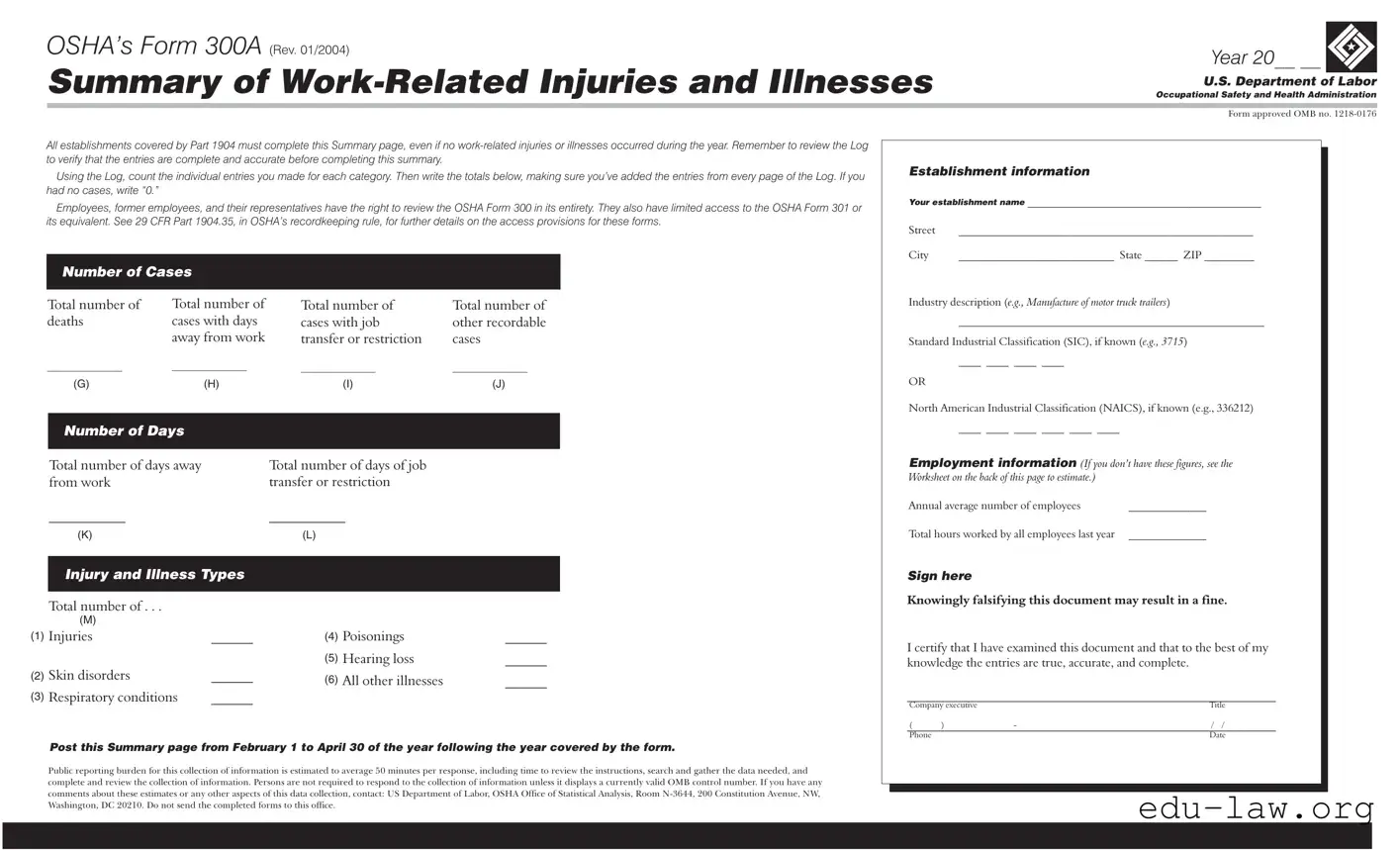
The OSHA Form 300A serves as a critical tool for employers in tracking and summarizing work-related injuries and illnesses within their establishments. This summary form is mandatory for all workplaces covered by OSHA regulations, regardless of whether any incidents occurred during the reporting year. Employers must accurately compile data from the OSHA Form 300, which details individual cases of injuries and illnesses, to complete the summary. Key components of the 300A include the total number of deaths, cases involving days away from work, and other recordable cases. Additionally, the form requires an industry description and relevant classification codes, such as the Standard Industrial Classification (SIC) or North American Industrial Classification System (NAICS). Employers must also provide data on the total hours worked and the annual average number of employees, which are essential for calculating injury rates. This summary must be posted in a visible location from February 1 to April 30 of the year following the reporting period, ensuring that employees and their representatives have access to this important information. The accuracy of the entries is paramount, as knowingly falsifying the form can lead to significant penalties. By adhering to these requirements, employers contribute to a safer workplace and foster transparency regarding occupational health and safety practices.

OSHA’s Form 300A (REV. 01/2004) |
Year 20__ __ |
|
Summary of |
|
|
Occupational Safety and Health Administration |
||
|
U.S. Department of Labor |
|
|
|
|
|
|
|
|
Form approved OMB no. |
|
All establishments covered by Part 1904 must complete this Summary page, even if no
Using the Log, count the individual entries you made for each category. Then write the totals below, making sure you’ve added the entries from every page of the Log. If you had no cases, write “0.”
Employees, former employees, and their representatives have the right to review the OSHA Form 300 in its entirety. They also have limited access to the OSHA Form 301 or its equivalent. See 29 CFR Part 1904.35, in OSHA’s recordkeeping rule, for further details on the access provisions for these forms.
Number of Cases
Establishment information
Your establishment name __________________________________________
Street |
_____________________________________________________ |
City |
____________________________ State ______ ZIP _________ |
Total number of deaths
__________________
(G)
Total number of cases with days away from work
__________________
(H)
Total number of |
Total number of |
cases with job |
other recordable |
transfer or restriction |
cases |
__________________ |
__________________ |
(I) |
(J) |
Industry description (e.g., Manufacture of motor truck trailers)
_______________________________________________________
Standard Industrial Classification (SIC), if known (e.g., 3715)
____ ____ ____ ____
OR
North American Industrial Classification (NAICS), if known (e.g., 336212)
Number of Days
Total number of days away |
Total number of days of job |
from work |
transfer or restriction |
___________ |
___________ |
____ ____ ____ ____ ____ ____
Employment information (If you don’t have these figures, see the Worksheet on the back of this page to estimate.)
Annual average number of employees |
______________ |
(K)
Injury and Illness Types
Total number of . . .
|
(M) |
|
(1) |
Injuries |
______ |
(2) |
Skin disorders |
______ |
(3) |
Respiratory conditions |
______ |
(L)
(4) |
Poisonings |
______ |
(5) |
Hearing loss |
______ |
(6) |
All other illnesses |
______ |
Total hours worked by all employees last year ______________ |
Sign here
Knowingly falsifying this document may result in a fine.
I certify that I have examined this document and that to the best of my knowledge the entries are true, accurate, and complete.
___________________________________________________________
Company executive |
|
Title |
|
( |
) |
- |
/ / |
Phone |
|
|
Date |
Post this Summary page from February 1 to April 30 of the year following the year covered by the form.
Public reporting burden for this collection of information is estimated to average 50 minutes per response, including time to review the instructions, search and gather the data needed, and complete and review the collection of information. Persons are not required to respond to the collection of information unless it displays a currently valid OMB control number. If you have any comments about these estimates or any other aspects of this data collection, contact: US Department of Labor, OSHA Office of Statistical Analysis, Room
| Fact Name | Details |
|---|---|
| Form Purpose | The OSHA Form 300A is used to summarize work-related injuries and illnesses that occur in the workplace over a calendar year. |
| Mandatory Requirement | All establishments covered by OSHA's Part 1904 must complete this summary, even if there were no reported injuries or illnesses during the year. |
| Review Process | Before completing the Form 300A, employers must review the Log of Work-Related Injuries and Illnesses to ensure all entries are complete and accurate. |
| Access Rights | Employees, former employees, and their representatives have the right to review the OSHA Form 300 in its entirety, along with limited access to the Form 301. |
| Reporting Period | The summary must be posted from February 1 to April 30 of the year following the year covered by the form. |
| Data Collection | The public reporting burden for completing this form is estimated to average 50 minutes per response, including data gathering and review. |
| Certification Requirement | A company executive must sign the form, certifying that the information provided is true, accurate, and complete. |
| State-Specific Forms | Some states may have additional requirements or specific forms that align with their occupational safety laws, such as California's Cal/OSHA regulations. |
| Legal Implications | Knowingly falsifying information on the OSHA Form 300A can lead to fines and other legal consequences. |
| Industry Classification | Employers are encouraged to provide their Standard Industrial Classification (SIC) or North American Industrial Classification (NAICS) codes to specify their industry. |
Completing OSHA's Form 300A is a crucial step for any establishment to summarize work-related injuries and illnesses. This summary must be filled out accurately, even if there were no incidents during the year. After gathering the necessary information, you will be ready to fill out the form. Follow these steps carefully to ensure compliance and accuracy.
Once completed, make sure to post this summary page prominently from February 1 to April 30 of the year following the reporting year. This ensures that employees, former employees, and their representatives can access it easily. Remember, accuracy is key, and any discrepancies may lead to penalties.
What is OSHA Form 300A?
OSHA Form 300A is a summary of work-related injuries and illnesses that employers must complete annually. It is required by the Occupational Safety and Health Administration (OSHA) for all establishments covered under Part 1904. The form provides a summary of the total number of work-related injuries and illnesses that occurred during the previous calendar year. Even if no incidents occurred, employers must still submit the form with a total of “0” for each category.
Who is required to complete OSHA Form 300A?
All employers covered by OSHA’s recordkeeping regulations must complete Form 300A. This includes businesses in various industries, regardless of size, that have had employees. The requirement applies even if there were no work-related injuries or illnesses during the reporting year. Employers must ensure that the information is accurate and complete before submission.
When should OSHA Form 300A be posted?
The completed OSHA Form 300A must be posted in a visible location within the workplace from February 1 to April 30 of the year following the year covered by the form. This allows employees, former employees, and their representatives to review the summary of work-related injuries and illnesses. Posting the form during this period is a legal requirement and helps promote workplace safety awareness.
What information is required on OSHA Form 300A?
OSHA Form 300A requires various pieces of information, including the establishment's name, address, and industry description. Employers must report the total number of deaths, cases with days away from work, cases with job transfer or restriction, and other recordable cases. Additionally, the form requires the annual average number of employees and total hours worked by all employees during the year. Accurate data collection is essential for compliance.
What are the consequences of falsifying OSHA Form 300A?
Knowingly falsifying OSHA Form 300A can result in significant penalties, including fines. Employers must certify that the information provided is true, accurate, and complete. Misrepresentation of data not only violates OSHA regulations but can also lead to legal consequences and damage to the company's reputation. It is crucial to maintain integrity in reporting workplace injuries and illnesses.
Failing to include all relevant injuries and illnesses. It's essential to review the Log thoroughly to ensure that every case is accounted for, even if some cases seem minor.
Not writing “0” when there are no incidents. If no work-related injuries or illnesses occurred during the year, it's important to explicitly state “0” in the appropriate section.
Neglecting to verify the totals from the Log. Before completing the summary, ensure that the totals reflect the accurate count of cases from every page of the Log.
Omitting establishment information. Providing the correct name, address, and industry classification is crucial for proper identification and record-keeping.
Ignoring the requirement to post the Summary page. The form must be displayed from February 1 to April 30 of the year following the reporting period.
Not including the total hours worked by all employees. This figure is necessary for calculating rates of injury and illness and should be estimated accurately if exact numbers are unavailable.
Failing to sign and date the form. The certification by a company executive is a legal requirement, ensuring that the information provided is true and complete.
The OSHA Form 300A is essential for summarizing work-related injuries and illnesses. However, several other forms and documents complement this form in ensuring workplace safety and compliance with regulations. Below is a list of related forms that are frequently used alongside the 300A.
Understanding these forms and documents is crucial for maintaining workplace safety and ensuring compliance with OSHA regulations. Properly managing and documenting workplace incidents can significantly enhance safety culture and reduce the risk of future injuries.
OSHA Form 300 is similar to the OSHA Form 301, which is the Injury and Illness Incident Report. While Form 300 provides a summary of work-related injuries and illnesses, Form 301 goes into detail about each specific incident. Employers fill out Form 301 for each case that appears on Form 300. This means that if an employee is injured, the employer documents the specifics of that injury on Form 301, including how it happened and the nature of the injury. Both forms work together to give a complete picture of workplace safety and health.
Another document that resembles Form 300 is the OSHA Form 300 Log. This log is used to record each work-related injury or illness as it occurs throughout the year. It provides a detailed account of incidents, including the date, description, and outcome of each case. The information from the Form 300 Log is essential for completing the Form 300A. Essentially, the Log serves as the foundation for the summary provided in Form 300A, ensuring that all incidents are accurately captured and reported.
The Workers' Compensation Claim Form is also similar to the OSHA Form 300A. When an employee gets injured on the job, they may file a workers' compensation claim to receive benefits. This form documents the injury and the associated costs. While OSHA focuses on workplace safety and reporting, the Workers' Compensation Claim Form emphasizes the financial and medical aspects of workplace injuries. Both documents aim to protect employees, but they do so from different angles.
The Incident Report used by many companies is another document that shares similarities with OSHA Form 300A. This internal report captures details about workplace incidents, including accidents and near misses. Companies often use it to analyze safety issues and prevent future occurrences. Like the OSHA forms, the Incident Report aims to improve workplace safety, although it is generally more focused on internal procedures rather than compliance with federal regulations.
In addition, the First Report of Injury (FROI) is comparable to the OSHA Form 300A. This document is typically filed with the state’s workers' compensation board when an employee is injured. The FROI includes details about the injury, the employee, and the employer. Both the FROI and OSHA Form 300A serve to document workplace injuries, but the FROI is specifically tied to workers' compensation claims and state requirements.
Lastly, the Safety Audit Report can be seen as similar to the OSHA Form 300A. Safety audits assess the effectiveness of a company's safety programs and compliance with regulations. They often include findings related to workplace injuries and illnesses. While OSHA Form 300A summarizes past incidents, the Safety Audit Report focuses on evaluating current safety practices and identifying areas for improvement. Both documents are essential for promoting a safe work environment.
When filling out OSHA’s Form 300A, it is essential to approach the task with care and attention to detail. Here are seven important guidelines to follow, as well as common pitfalls to avoid.
By adhering to these guidelines, you can ensure that the Form 300A is filled out correctly and complies with OSHA regulations. This not only protects your organization but also promotes a culture of safety and transparency in the workplace.
Understanding OSHA's Form 300A is crucial for workplace safety compliance. However, several misconceptions can lead to confusion. Here are nine common misunderstandings about this form:
Clarifying these misconceptions can help ensure compliance and promote a safer workplace environment.
When filling out and using the OSHA Form 300A, it's essential to follow specific guidelines to ensure accuracy and compliance. Here are seven key takeaways to keep in mind: